
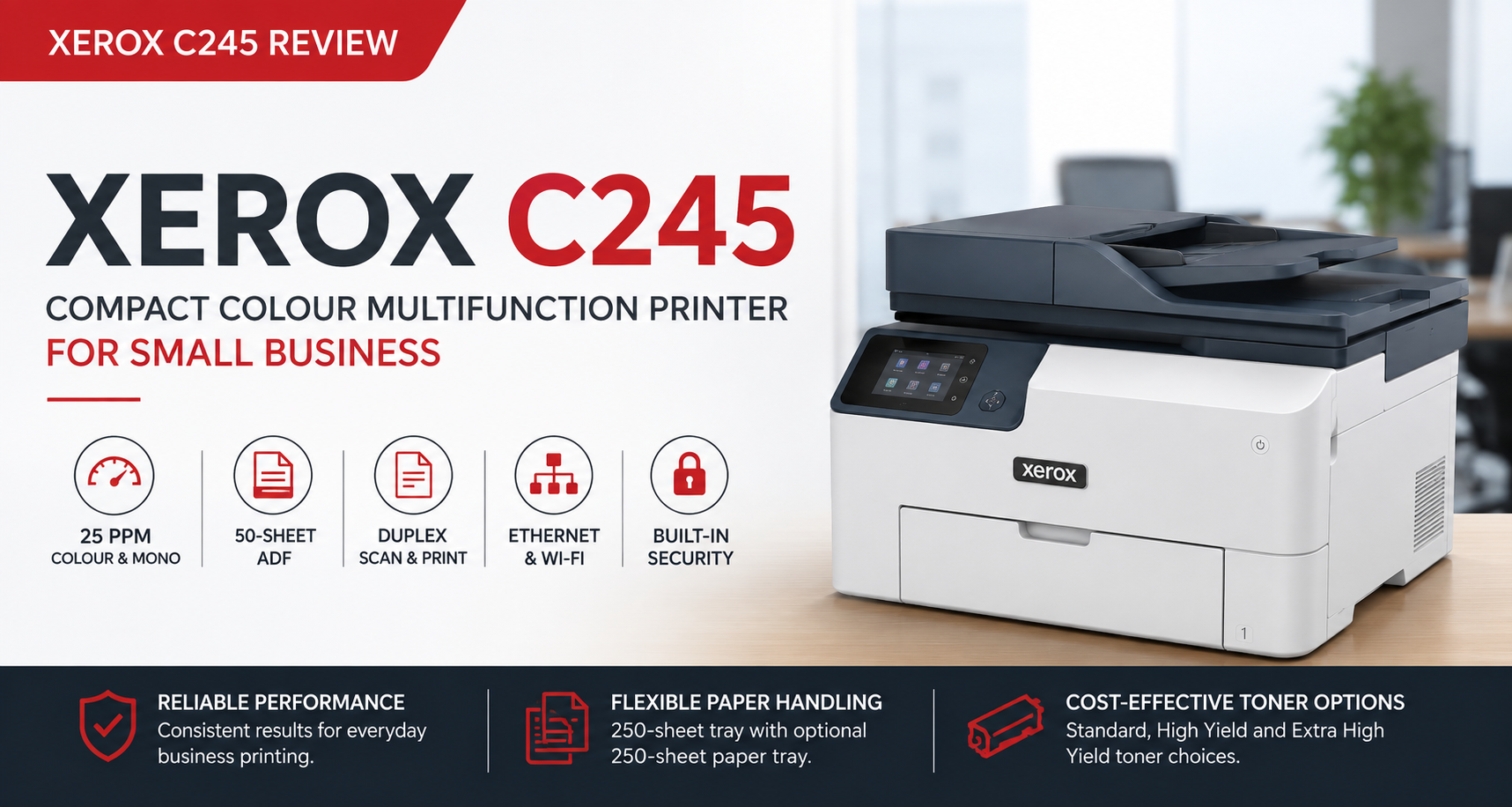
If you are looking for a compact colour laser multifunction printer for a small business, the Xerox C245 deserves a closer look. It combines 25ppm colour printing, a 50-sheet Automatic Document Feeder, automatic duplex scanning, Ethernet, Wi-Fi and expandable paper handling in a machine designed for small workgroups rather than large corporate print rooms.
For Australian buyers, there is another reason this model is interesting. Many customers still recognise and search for the old Fuji Xerox name, but the printer market has changed significantly. The C245 belongs to a new generation of Xerox desktop printers introduced following Xerox's integration with Lexmark. By the end of this review, you should have a clear idea of whether the C245 is right for your business, whether the print-only C300 would suit you better, and which types of workplaces will benefit most from the C245.

Xerox C245 at a Glance
- A4 colour laser multifunction printer
- Print, scan and copy
- Up to 25 pages per minute in colour and monochrome
- Automatic duplex printing
- 50-sheet Automatic Document Feeder
- Automatic duplex document scanning
- 250-sheet main paper tray
- Single-sheet manual feed
- Supports one optional additional 250-sheet paper tray
- 2.8-inch colour touchscreen
- Gigabit Ethernet
- Dual-band Wi-Fi
- USB connectivity
- Apple AirPrint and mobile printing support
- Standard, High Yield and Extra High Yield toner options
- 1-Year Advanced Exchange Warranty in Australia
For a compact A4 multifunction printer, this is a well-balanced specification. It sits above a basic home printer but remains much smaller and simpler than an A3 departmental copier.
For current pricing and availability, see the Xerox C245 Colour Multifunction Printer product page.
Why the Xerox C245 Is Different from the Fuji Xerox Printers Australians Remember
Australian customers have a long history with Fuji Xerox. For decades, Fuji Xerox desktop printers and office copiers were widely used across businesses, schools and government organisations.
Fuji Xerox later became FUJIFILM Business Innovation. Xerox and Fujifilm are now separate companies, and the Xerox C245 is not simply a renamed Fuji Xerox desktop printer.
The C245 belongs to the new Xerox A4 product portfolio introduced after Xerox acquired and integrated Lexmark. Xerox describes the new C-Series as being designed for small workgroups and hybrid work environments, with an emphasis on compact design, straightforward deployment and built-in security.
You can read the official Xerox C245 product information or Xerox's official announcement of the new C-Series range for more background.
We also covered the Australian and New Zealand launch in our Xerox C245 and C300 launch guide.
Who Is the Xerox C245 Best Suited To?
The C245 makes the most sense for a small business or small workgroup that prints regularly but also needs to scan and copy multi-page documents. Its combination of an ADF, duplex scanning and network connectivity makes it much more useful in a shared workplace than an entry-level consumer multifunction printer.
Accounting and Bookkeeping Practices
Accountants and bookkeepers regularly handle invoices, statements, tax records and client documents. The 50-sheet ADF and automatic duplex scanning allow multi-page and double-sided originals to be digitised without placing each sheet manually on the scanner glass.
Medical and Allied Health Clinics
Medical and allied health practices often need a shared printer for forms, correspondence, patient information and administration documents. Ethernet connectivity allows the printer to be placed on a wired office network, while the ADF makes routine document scanning much faster.
Real Estate and Property Management
Real estate offices regularly produce property information, agreements, application forms, reports and colour presentation documents. The C245 gives these users business-quality colour output without taking up the space required by a larger A3 copier.
Legal and Professional Services
Solicitors, consultants and professional service businesses often need dependable printing together with frequent scanning and copying. Automatic duplex printing and duplex scanning can substantially reduce manual handling of contracts, reports and client paperwork.
Schools and Education
The C245 suits smaller education workgroups and administration teams producing worksheets, reports, forms, correspondence and colour educational materials.
Retail, Reception and Customer Service Areas
Its compact footprint makes it practical for reception desks, customer service areas and retail back offices where floor space is limited but staff still need access to colour printing, scanning and copying.
Home Offices
A light home user who only prints occasionally may not need a machine at this level. However, for a serious home office processing regular invoices, contracts and business documents, the ADF, Ethernet, Wi-Fi and duplex features are a meaningful upgrade over a basic home multifunction printer.
Former Fuji Xerox Users
The C245 is particularly relevant to customers searching for a modern replacement for an older Fuji Xerox DocuPrint desktop machine. It brings the Xerox name back into an affordable compact A4 colour multifunction category, although the technology platform and corporate lineage are different from the former Fuji Xerox products.
Official Xerox C245 Video
This official Xerox video provides a useful overview of the C245 and the related new Xerox A4 colour range.
Print Performance: Is 25ppm Fast Enough?
The Xerox C245 prints at up to 25 pages per minute in both colour and monochrome. It is not intended to compete with high-volume departmental machines on raw speed, but 25ppm is well suited to the type of small workgroup Xerox is targeting.
For an office printing invoices, quotations, reports, presentations, correspondence and day-to-day business documents, the difference between 25ppm and a slightly faster machine is often less important than workflow features such as reliable network connectivity, an ADF and duplex scanning.
If your business does not need scanning or copying and would prefer faster 30ppm printing, the related Xerox C300 Colour Printer may be a better fit.
50-Sheet ADF and Automatic Duplex Scanning
The 50-sheet Automatic Document Feeder is one of the strongest reasons to choose the C245.
It allows users to load multi-page documents such as invoices, contracts, statements, reports and application forms rather than scanning each page individually.
More importantly, the C245 supports automatic duplex document scanning. For businesses that regularly receive double-sided paperwork, this saves considerable time compared with an ADF that scans only one side at a time.
This is one of the features that moves the C245 beyond the typical home multifunction printer and into genuine small-workgroup territory.
Automatic Duplex Printing
Automatic two-sided printing is included as standard. Businesses can produce double-sided reports, proposals and everyday documents without manually reinserting paper.
Over time, duplex printing can reduce paper consumption and make stored documents less bulky, particularly in offices with regular print volumes.

Paper Capacity and the Optional 250-Sheet Tray
The C245 includes a 250-sheet main paper tray plus a single-sheet manual feed.
That capacity is sufficient for most small offices, but businesses that print more frequently or regularly use two different paper stocks can add one optional 250-sheet tray. The compatible tray is Xerox part number 097S05292.
A practical configuration could use the main tray for standard A4 paper, the optional tray for letterhead or pre-printed forms, and the manual feed for envelopes, labels or specialty media.
The C245 accepts one additional 250-sheet tray. By comparison, the print-only C300 can accept up to two. If large paper capacity is a priority, our Xerox C300 review explains that model's paper-handling advantages in more detail.
USB, Ethernet and Wi-Fi Connectivity
The Xerox C245 provides USB, Gigabit Ethernet and dual-band Wi-Fi.
Ethernet is particularly valuable in a professional office. A wired connection allows the printer to connect directly to a network switch, router or patch panel and be shared reliably between several users without depending entirely on wireless signal strength.
Wi-Fi remains useful for flexible placement and mobile devices, while USB is available for a direct computer connection.
Toner Choices and Long-Term Running Costs
The C245 supports Standard, High Yield and Extra High Yield genuine Xerox toner cartridges. This gives businesses more flexibility than a printer with only one cartridge capacity.
Standard Yield cartridges are best suited to lighter users who want to keep replacement consumable costs lower upfront.
High Yield cartridges suit regular small-business printing and reduce how often cartridges need to be replaced.
Extra High Yield cartridges are designed for busier workgroups. The Extra High Yield black cartridge is rated at approximately 6,210 pages, while the Extra High Yield cyan, magenta and yellow cartridges are rated at approximately 6,400 pages each.
For businesses printing regularly, the larger cartridges generally make more sense because fewer cartridge changes reduce interruptions and the effective cost per page is usually lower.
The printer also uses the Xerox 008R08165 waste toner bottle, with replacement frequency depending on print volume and page coverage. Check out our Xerox Printers collection.
Security and Small-Business Deployment
Modern printers are network devices, and security increasingly matters even in smaller workplaces.
Xerox has positioned the new C-Series with built-in security features intended to help protect the device, documents and network access. Xerox has also highlighted post-quantum cryptography support as part of the platform's longer-term security approach.
For accounting firms, medical practices, legal offices and businesses handling customer or employee information, printer security should be considered part of the wider office IT environment rather than an optional extra.
Xerox C245 vs Xerox C300
| Feature | Xerox C245 | Xerox C300 |
|---|---|---|
| Device Type | Colour Multifunction Printer | Colour Printer |
| Yes | Yes | |
| Scan | Yes | No |
| Copy | Yes | No |
| Print Speed | Up to 25ppm | Up to 30ppm |
| 50-Sheet ADF | Yes | Not applicable |
| Automatic Duplex Scanning | Yes | Not applicable |
| Automatic Duplex Printing | Yes | Yes |
| Standard Paper Tray | 250 sheets | 250 sheets |
| Optional 250-Sheet Trays | Up to 1 | Up to 2 |
| Ethernet | Yes | Yes |
| Wi-Fi | Yes | Yes |
| Best For | Small office needing print, scan and copy | Print-focused workgroup needing more speed and paper capacity |
Choose the Xerox C245 if your business needs one compact device for colour printing, multi-page scanning and copying.
Choose the Xerox C300 if scanning and copying are unnecessary and you would rather have faster printing and greater paper-tray expansion.
Advantages of the Xerox C245
- Compact A4 colour multifunction design
- Print, scan and copy in one device
- 25ppm colour and monochrome printing
- 50-sheet Automatic Document Feeder
- Automatic duplex document scanning
- Automatic duplex printing
- Gigabit Ethernet, Wi-Fi and USB
- 250-sheet standard paper tray
- Optional additional 250-sheet tray
- Three toner-yield levels
- Suitable for shared small-office use
- 1-Year Advanced Exchange Warranty in Australia
Points to Consider
- The C245 is an A4 printer and does not support A3 printing.
- The C300 is faster if you only need printing.
- The C245 accepts one optional paper tray rather than two on the C300.
- Very high-volume workgroups may be better served by a larger business printer.
- A light home user who rarely scans or copies may not need this level of functionality.
Final Verdict
The Xerox C245 is a well-balanced colour multifunction printer for Australian small businesses, professional offices and serious home-office users.
Its strongest selling point is the combination of features rather than a single headline specification: 25ppm output, a 50-sheet ADF, automatic duplex scanning, automatic duplex printing, Ethernet, Wi-Fi, expandable paper capacity and several toner-yield choices all sit inside a compact A4 platform.
That combination makes the C245 particularly attractive for businesses that need more capability than a consumer multifunction printer but do not want the size, complexity or cost of a larger departmental copier.
For former Fuji Xerox customers, it is also an interesting return of the Xerox name to the compact Australian A4 colour market — although this is a new-generation Xerox platform rather than a continuation of the old Fuji Xerox range.
Our recommendation: Choose the C245 if your office regularly prints colour documents and also handles multi-page scanning and copying. Choose the C300 if scanning is unnecessary and print speed and paper capacity matter more.
Frequently Asked Questions (FAQ)
Is the Xerox C245 the same as a Fuji Xerox printer?
No. Fuji Xerox became FUJIFILM Business Innovation. The Xerox C245 belongs to Xerox's newer product portfolio introduced following Xerox's integration with Lexmark.
How fast is the Xerox C245?
The Xerox C245 prints A4 colour and monochrome documents at up to 25 pages per minute.
Does the Xerox C245 scan both sides automatically?
Yes. The 50-sheet ADF supports automatic duplex document scanning.
Can the Xerox C245 print double-sided automatically?
Yes. Automatic duplex printing is included as standard.
Does the Xerox C245 have Ethernet and Wi-Fi?
Yes. It supports Gigabit Ethernet, dual-band Wi-Fi and USB connectivity.
Can I add another paper tray to the Xerox C245?
Yes. The C245 supports one optional 250-sheet paper tray, Xerox part number 097S05292.
What toner does the Xerox C245 use?
The C245 uses the Xerox C245/C300 toner family, with Standard, High Yield and Extra High Yield black, cyan, magenta and yellow cartridges.
What is the difference between the Xerox C245 and C300?
The C245 is a multifunction device with printing, scanning and copying. The C300 is a faster print-only model and supports up to two additional 250-sheet paper trays.
Is the Xerox C245 suitable for a small business?
Yes. Its ADF, duplex scanning, network connectivity, colour printing and expandable paper capacity make it particularly well suited to small businesses and small shared workgroups.
What warranty does the Xerox C245 include?
The Australian C245 includes a 1-Year Advanced Exchange Warranty, subject to Xerox warranty terms and conditions.