
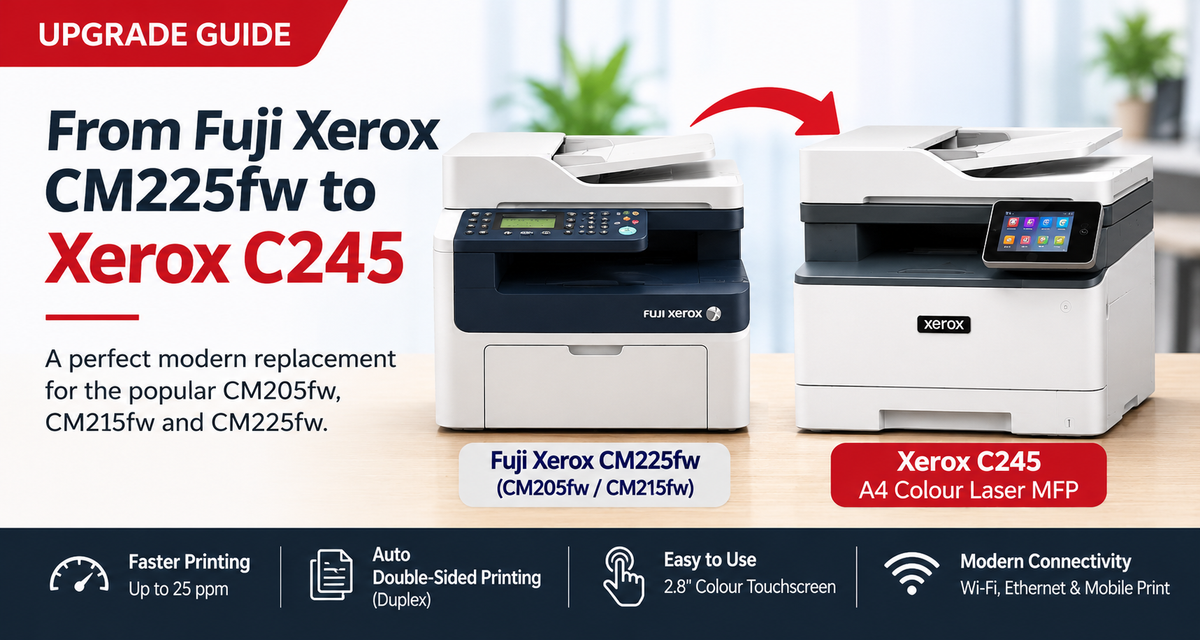

A familiar, compact colour multifunction printer experience — reimagined for today's Australian homes and small businesses.
For more than a decade, Fuji Xerox DocuPrint CM205fw, CM215fw and CM225fw printers have been familiar fixtures in Australian homes and small offices. At OzToner, we've supplied printers and consumables since 2002, and we still hear from customers using these classic machines today.
So why did they become so popular — and what should you buy when yours is finally ready to retire?
Why the Classic CM Series Won So Many Customers
The formula was refreshingly practical: compact dimensions, affordable entry into colour laser-class printing, and the everyday ability to print, copy and scan without a large office machine. Selected models also offered fax functionality.
These printers were particularly well suited to households, home offices and small businesses printing occasionally rather than continuously. At 20 pages a week, a customer prints only about 1,040 pages a year — roughly 10,400 pages over a decade. Low accumulated page counts help explain why many of these machines have remained useful for so long, although components can still deteriorate with age.
Easy to Operate — and Easy to Feel Confident Using
One of the strongest compliments we have heard from customers, particularly older users, is how straightforward their Fuji Xerox printer feels. Once they learn the basic controls, they can confidently make a copy, scan a document or print a letter without navigating confusing options.
For these customers, simplicity is not a minor feature. It is the reason they enjoy using the machine. The best printer is often the one that lets you complete an everyday task without thinking about the technology.
Even the absence of automatic double-sided printing on the CM225fw was acceptable to many occasional users: they could turn the sheet over manually when needed. For a closer look at that classic machine, see our original Fuji Xerox CM225fw review.

When an Old Favourite Starts to Show Its Age
These entry-level desktop printers were not designed around the same extensive servicing model as large office copiers. As they age, internal maintenance, waste-toner handling, component access and spare-parts availability can make some repairs difficult or uneconomical. The cost of labour and replacement parts can sometimes outweigh the value of the machine.
That does not mean you should replace a working printer. If your CM-series machine still prints well, connects to your computer and has suitable toner available, there may be no reason to retire it yet. But when faults become frequent or expensive, a modern alternative makes sense.
Good News for CM-Series Owners: Meet the Xerox C245
The Xerox C245 A4 Colour Multifunction Printer is an excellent modern replacement choice for customers who appreciate the CM series' practical, compact all-in-one approach. It serves a similar home-office and small-business audience while offering a substantial upgrade in everyday convenience.
Its 2.8-inch colour touchscreen offers a modern way to access print, copy and scan functions. Customers moving from older buttons and menus may need a little time to adjust, but the goal is familiar: straightforward everyday operation.

What Has Improved?
| Feature | Fuji Xerox CM225fw | Xerox C245 |
|---|---|---|
| A4 colour printing | Yes | Yes |
| Rated print speed | Up to 18ppm | Up to 25ppm |
| Automatic duplex printing | No | Yes |
| Main paper tray | 150 sheets | 250 sheets |
| ADF | Yes | Yes, simplex scanning |
| Networking | Wi-Fi / Ethernet | Dual-band Wi-Fi / Gigabit Ethernet |
| User controls | Earlier-generation interface | 2.8-inch colour touchscreen |
| Toner choices | Legacy CM-series cartridges | Standard, High Yield and Extra High Yield |
Comparison focuses on the CM225fw; specifications and functions differ among CM205 and CM215 variants. The C245 supports automatic duplex printing, not automatic duplex ADF scanning.
The C245's rated print speed is approximately 39% higher than the CM225fw's. Its automatic double-sided printing removes a manual step, while the larger paper tray means fewer refills. For more details, read our in-depth Xerox C245 review.
What About Toner and Running Costs?
Genuine toner for the older CM series was not particularly inexpensive, and the Xerox C245 is not intended to be the lowest-cost-per-page solution for every high-volume business. But light users often care more about a compact, dependable machine than shaving fractions of a cent off every print.
The C245 offers Standard, High Yield and Extra High Yield cartridges. Higher-capacity options can reduce replacement frequency for customers printing more regularly. Customers printing thousands of pages every month should also compare higher-volume business printers before deciding.
Maintenance and Long-Term Ownership
As a current-generation model, the C245 has contemporary manufacturer documentation, consumable replacement procedures and support channels. That is a meaningful advantage over trying to keep an ageing discontinued printer operating. Nevertheless, the feasibility of a particular repair depends on the fault, the availability of parts and the repair cost; no compact printer should be assumed to be economical to repair in every situation.
Should You Replace Your Old CM205fw, CM215fw or CM225fw?
Keep it if it works reliably, still meets your needs and you can source appropriate toner. Consider the C245 if your old machine is failing, you want automatic double-sided printing, or you would benefit from faster printing, better networking and a modern touchscreen. Consider a higher-volume model if minimising cost per page is your overriding priority.
Frequently Asked Questions (FAQ)
Is the Xerox C245 a good replacement for the Fuji Xerox CM series?
Yes. For customers who valued a compact colour multifunction printer for everyday home or small-office tasks, the C245 is an excellent modern alternative. It is a functional replacement recommendation, not a claim of manufacturer-designated succession.
Can I reuse my CM225fw toner in the C245?
No. The C245 uses a different cartridge family; older CM-series toner cartridges are not interchangeable.
Does the C245 print and scan both sides automatically?
It prints double-sided automatically. Its automatic document feeder is simplex, so it does not automatically scan both sides of a document.
Is the C245 suitable for occasional home printing?
Yes, especially when you want colour printing, copying and scanning in one machine. Choose the printer according to your available space, connectivity requirements and expected printing volume.
Final Verdict: A Familiar Idea, a New Generation
The Fuji Xerox CM205fw, CM215fw and CM225fw earned loyal customers by making everyday colour printing straightforward and accessible. Their long service in Australian homes and small businesses says a great deal about how well that practical concept suited light users.
The Xerox C245 is a compelling next step: familiar all-in-one convenience, with faster printing, automatic duplex output, a larger tray, modern wireless networking and a touchscreen. You may not need a bigger printer. You may simply need a more capable one.
Ready to explore your options? View the Xerox C245 A4 Colour Multifunction Printer at OzToner.
OzToner has supplied printers and consumables to Australian customers since 2002. Last updated: 18 November 2026 (Sydney time).