
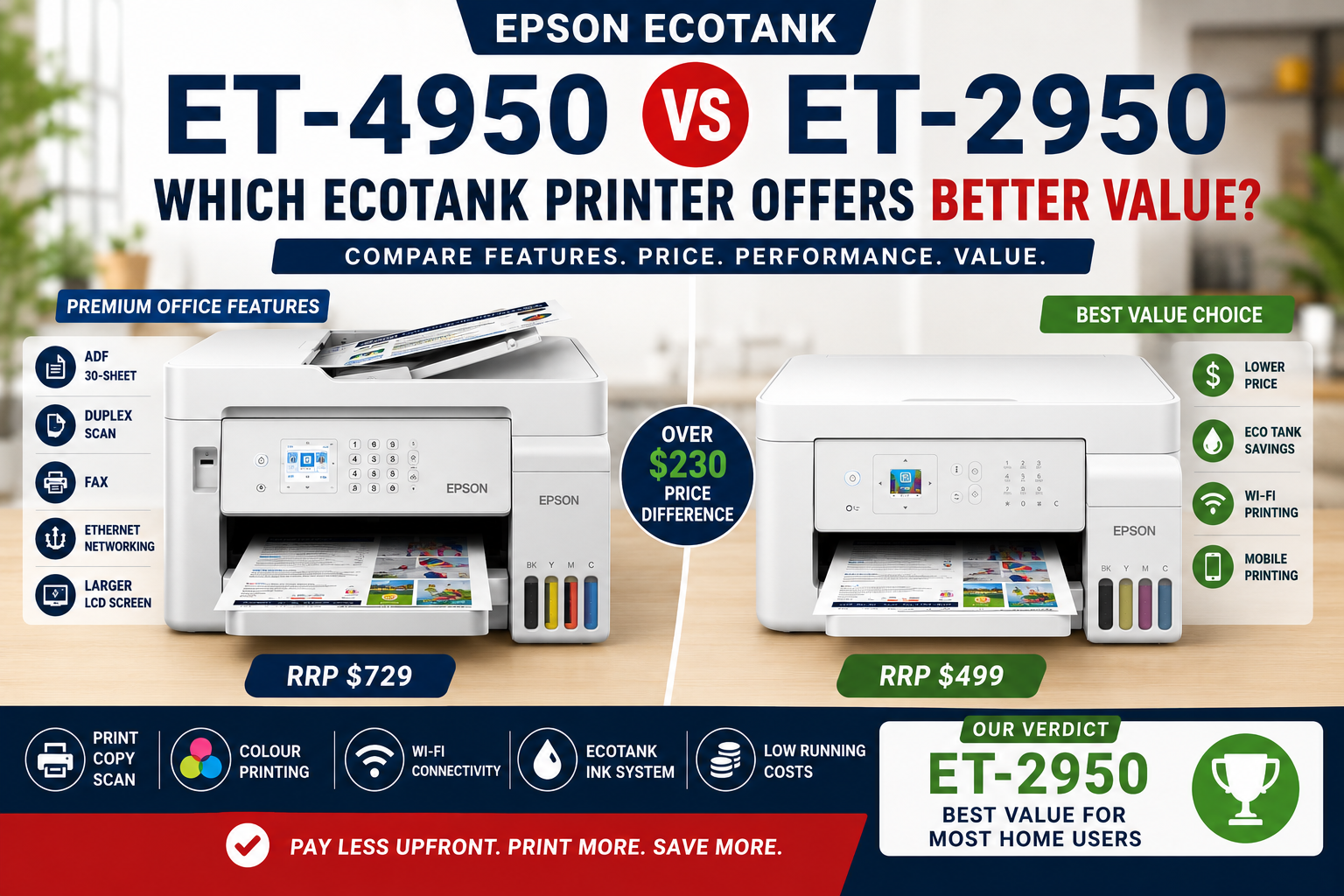
The Epson EcoTank ET-2950 and ET-4950 use the same refillable 502 ink system, but they are designed for very different workloads.
The ET-2950 is the simpler, more compact option for households, students and lighter home-office printing. The ET-4950 moves much further into genuine office territory with a 30-sheet Automatic Document Feeder, two-sided scanning, fax, Ethernet networking, a larger 250-sheet paper tray and a touchscreen control panel.
So this comparison is less about print quality or ink cost and more about workflow.
If most of your printing is homework, household documents, occasional colour pages and photos, the ET-2950 may already do everything you need. If you regularly scan multi-page paperwork, share the printer across an office network or need fax and higher paper capacity, the ET-4950 earns its higher price much more easily.
ET-2950 vs ET-4950: Quick Buying Guide
Choose the Epson ET-2950 if:
- You mainly need print, scan and copy.
- You usually scan one page at a time.
- You do not need fax.
- Wi-Fi is enough and you do not need Ethernet.
- A 100-sheet paper feed is adequate.
- You want a smaller, lower-cost EcoTank for home or light office use.
Choose the Epson ET-4950 if:
- You regularly scan or copy multi-page documents.
- You need automatic two-sided scanning.
- You want a 30-sheet Automatic Document Feeder.
- You need fax.
- You want Ethernet for a shared office network.
- You prefer a 250-sheet paper tray.
- Your printer is part of a daily work-from-home or small-business workflow.
Bottom line: the ET-2950 is the better fit for lighter home use. The ET-4950 is worth paying more for when document handling and office productivity matter.
The Most Important Difference Is Not the Ink
At first glance, these two printers may look like very different EcoTank models, but they actually share several fundamentals.
Both use Epson's four-colour EcoTank system and the same Epson 502 Black, Cyan, Magenta and Yellow replacement ink bottles. Epson publishes the same replacement ink yields of up to approximately 8,500 black pages and 6,500 co
That means the decision between ET-2950 and ET-4950 is not really about choosing a cheaper or more expensive ink system.
The real question is:
How much document handling do you need the printer to do for you?
Epson ET-2950 vs ET-4950 Specifications
| Feature | Epson ET-2950 | Epson ET-4950 | Why It Matters |
|---|---|---|---|
| Functions | Print, Copy, Scan | Print, Copy, Scan, Fax | ET-4950 adds fax |
| ISO Print Speed | 15 ppm black / 8 ppm colour | 18 ppm black / 9 ppm colour | ET-4950 is faster, especially for black office documents |
| Automatic 2-Sided Printing | Yes | Yes | Both can reduce paper use |
| Automatic Document Feeder | No | 30 sheets | One of the biggest workflow differences |
| 2-Sided Scanning | No automatic duplex scanning | Yes | Important for contracts, forms and double-sided paperwork |
| Scanner | Flatbed | Flatbed + ADF | ET-4950 handles document stacks much more efficiently |
| Fax | No | Yes | Useful in some professional and legacy workflows |
| Paper Input | 100-sheet rear feed | 250-sheet tray | ET-4950 needs refilling less often |
| Display | 1.44-inch colour LCD | 2.4-inch colour touchscreen | ET-4950 is easier to operate directly from the printer |
| Wi-Fi | Wi-Fi 5, 2.4GHz, Wi-Fi Direct | Wi-Fi 5 dual-band 2.4/5GHz, Wi-Fi Direct | ET-4950 offers broader wireless networking support |
| Ethernet | No | Yes | ET-4950 is better suited to shared wired office networks |
| Ink Family | Epson 502 | Epson 502 | Running-cost platform is broadly similar |
| Maximum Print Resolution | 4,800 × 1,200 dpi | 4,800 × 1,200 dpi | No meaningful advantage here |
| Weight | Approx. 5.2 kg | Approx. 7.3 kg | ET-2950 is the lighter, simpler machine |
Specifications are based on Epson Australia product information. Actual performance can vary according to print settings, document complexity and system configuration.
The ET-2950 Is Designed Around Simplicity
The ET-2950 makes most sense when printing is important but document handling is not.
It gives you the core EcoTank experience:
- Refillable high-capacity ink tanks
- Automatic two-sided printing
- Wireless printing
- Wi-Fi Direct
- Mobile printing
- Flatbed scanning
- Copy functionality
- Borderless photo printing
For many households, that is already enough.
A student printing assignments, a family printing school material, or a home user occasionally scanning a bill or document may gain little from paying for a fax modem or 30-sheet ADF that rarely gets used.
This is where the ET-2950's simplicity becomes a strength rather than a weakness.
The ET-4950 Is Built Around Document Workflow
The ET-4950 becomes much more compelling when paperwork is part of your daily routine.
Its 30-sheet Automatic Document Feeder means you can place a stack of documents in the feeder rather than scanning each page individually on the glass.
It also supports two-sided scanning, which is particularly useful for:
- Contracts
- Invoices
- Statements
- Applications
- Forms
- Medical paperwork
- Property and legal documents
- Business records
This is the type of feature that may look minor on a specification sheet but becomes very noticeable after you have manually flipped twenty double-sided pages.
For someone scanning paperwork every day or every week, the ET-4950 is not simply the more expensive model—it is a different level of workflow tool.
No ADF on the ET-2950: Does It Matter?
This depends entirely on how you scan.
If you scan one driver's licence, receipt, photograph or signed page occasionally, the ET-2950's flatbed scanner is perfectly reasonable.
If someone gives you a 15-page document, however, the difference becomes obvious.
With the ET-2950, each page needs to be placed and handled manually.
With the ET-4950, the document can be loaded into the ADF and processed much more efficiently.
For a household this may be an occasional inconvenience. For a home office, accountant, consultant, healthcare practice or small business, it can become lost time.
Paper Handling: 100 Sheets vs 250 Sheets
The ET-2950 uses a 100-sheet rear paper feed. The ET-4950 increases main paper capacity to 250 sheets.
Again, the significance depends on print volume.
If you print 20 or 30 pages in a typical week, a 100-sheet feeder may last quite a while.
If you regularly produce large reports, invoices or business documents, the ET-4950's larger capacity means fewer interruptions to refill paper.
A full 250-sheet tray also aligns neatly with a standard ream workflow: load approximately half a 500-sheet ream and get back to work.
Print Speed: The ET-4950 Has an Edge
The ET-2950 is rated at up to 15 ISO ppm black and 8 ISO ppm colour, while the ET-4950 increases this to 18 ISO ppm black and 9 ISO ppm colour.
This is not an enormous difference, especially for occasional household printing.
But over a larger workload, the ET-4950's faster black document speed reinforces its stronger office positioning.
It is worth noting that both models support automatic two-sided printing, so the ET-2950 does not give up duplex printing simply because it is the lower model.
Same 502 Ink: Running Cost Is Not the Main Decider
Both printers use Epson 502 ink bottles.
Epson Australia currently publishes replacement yields of approximately:
- 8,500 pages in black
- 6,500 pages in colour
under Epson's stated ISO methodology.
This means buyers should not assume the ET-4950 necessarily costs significantly more to operate simply because the printer itself costs more.
Both are built around the same high-yield cartridge-free EcoTank proposition.
The purchase-price difference is mainly buying you productivity hardware and office functionality, not a completely different consumables system.
Connectivity: Wireless Home Printer vs Networked Office Printer
The ET-2950 supports Wi-Fi 5 on 2.4GHz, Wi-Fi Direct and common mobile printing services including Epson Smart Panel, AirPrint and Mopria. :contentReference[oaicite:5]{index=5}
For a typical household, that is more than adequate.
The ET-4950 adds:
- 2.4GHz and 5GHz dual-band wireless networking
- Ethernet
- Wi-Fi Direct
Ethernet can be particularly valuable in an office where a printer is shared between several computers and network stability matters more than convenience.
So while both models are wireless printers, the ET-4950 gives you more ways to integrate the printer into a business network.
Fax: Important for Some, Completely Irrelevant for Others
The ET-2950 does not include fax.
The ET-4950 does.
For many homes, this difference should have zero influence on the buying decision.
However, fax is still used in parts of healthcare, law, government administration, property and older business workflows.
If you work in one of those environments, buying the ET-2950 and discovering later that you still need fax can be frustrating.
If you have not sent a fax in ten years, don't let the presence of fax alone persuade you to spend more.
ET-2950 for Home: Probably Enough for More People Than You Think
The ET-2950 is a strong match for:
- Families
- Students
- School homework
- General household printing
- Occasional photo printing
- Home users who scan infrequently
- Light work-from-home use
If that sounds like your workload, the ET-2950 may be the smarter purchase because you are not paying for office features that spend most of their life unused.
You can view the Epson EcoTank ET-2950 at OzToner.
ET-4950 for Home Office and Small Business
The ET-4950 makes more sense for:
- Full-time work-from-home users
- Small businesses
- Bookkeeping and administration
- Professionals processing paperwork
- Multi-user office environments
- Anyone regularly scanning multi-page documents
- Users who need fax
The combination of ADF, duplex scanning, larger paper capacity, Ethernet and faster printing creates a noticeably better business workflow.
You can view the Epson EcoTank ET-4950 at OzToner.
Is the ET-4950 Worth the Extra Money?
There is no universal answer because the value depends on which features you will actually use.
The ET-4950 is probably worth the extra cost if you regularly use two or more of these:
- ADF scanning
- Two-sided scanning
- 250-sheet paper capacity
- Ethernet
- Fax
- Higher document print speed
If none of those features matter much to you, the ET-2950 starts to look very sensible.
This is why we would avoid describing the ET-4950 simply as “better”. It is more capable, but capability only has value when it solves a real requirement.
Which One Wins Each Category?
| Category | Winner | Reason |
|---|---|---|
| Lowest Purchase Cost | ET-2950 | Simpler hardware and fewer office features |
| Print Speed | ET-4950 | 18 ppm vs 15 ppm black |
| Automatic Duplex Printing | Tie | Both support it |
| Multi-Page Scanning | ET-4950 | 30-sheet ADF |
| Two-Sided Scanning | ET-4950 | Designed for duplex document workflows |
| Paper Capacity | ET-4950 | 250 sheets vs 100 sheets |
| Fax | ET-4950 | ET-2950 has no fax |
| Ethernet | ET-4950 | Better for shared wired networks |
| Ink Compatibility | Tie | Both use Epson 502 bottles |
| Home and Student Use | ET-2950 | Lower-cost and simpler |
| Home Office / Small Business | ET-4950 | Much stronger document-handling workflow |
Our Verdict: Buy for Your Workflow
The Epson ET-2950 and ET-4950 share the same fundamental EcoTank advantage: high-capacity refillable 502 ink bottles and low ongoing ink costs.
From there, they head in different directions.
The ET-2950 is the more logical choice for homes, students and lighter users who primarily print and only occasionally scan.
The ET-4950 is the better choice for serious home-office and small-business workflows where scanning, document feeding, networking and paper capacity matter every day.
So before paying more, don't ask whether the ET-4950 has more features.
It clearly does.
Ask whether those features will actually save you time.
If the answer is yes, the ET-4950 is worth the step up. If the answer is no, the ET-2950 may be the better-value EcoTank.
Where Does the ET-3950 Fit?
There is also a useful middle ground.
If you like the ET-4950's stronger document-handling features but do not need fax, the ET-3950 deserves serious consideration.
It offers much of the ET-4950's office-oriented functionality—including ADF and two-sided scanning—without the fax function.
Read our Epson ET-3950 vs ET-4950 comparison to see why those two machines are much closer than their model numbers suggest.
If you are replacing an older office EcoTank, you can also read our Epson ET-4950 vs ET-4850 comparison.
Frequently Asked Questions (FAQ)
What is the main difference between Epson ET-2950 and ET-4950?
The ET-4950 adds a 30-sheet Automatic Document Feeder, two-sided scanning, fax, Ethernet, larger paper capacity, faster printing and a larger touchscreen. The ET-2950 is a simpler print, scan and copy model aimed more at home and lighter workloads.
Does the Epson ET-2950 have an Automatic Document Feeder?
No. Epson Australia lists the ET-2950 with a flatbed scanner and no ADF.
Can the ET-2950 scan double-sided documents automatically?
No. Its scanning system is based around a single-sided flatbed workflow. Double-sided originals require manual handling.
Does the ET-2950 have automatic duplex printing?
Yes. Although it does not have duplex scanning, the ET-2950 does support automatic two-sided printing.
Does the Epson ET-2950 have fax?
No. The ET-2950 does not include fax functionality.
Does the ET-2950 have Ethernet?
No. It uses USB, Wi-Fi and Wi-Fi Direct. The ET-4950 adds Ethernet networking.
Do ET-2950 and ET-4950 use the same ink?
Yes. Australian models use Epson 502 black, cyan, magenta and yellow EcoTank ink bottles.
Which printer is better for students?
The ET-2950 is likely to suit most students better because it retains EcoTank's low running costs, wireless printing and automatic duplex printing without the higher cost of office-oriented features they may rarely use.
Which printer is better for working from home?
For occasional work-from-home printing, the ET-2950 may be sufficient. For full-time home-office use involving contracts, reports, invoices or frequent scanning, the ET-4950's ADF, duplex scanning, Ethernet and 250-sheet tray make it the stronger choice.
Is the ET-4950 worth paying more for?
It is worth paying more when you regularly need its document-handling and office features. If you mainly print and occasionally scan individual pages, the ET-2950 can offer better value.
Sources and Specification Notes
Technical specifications in this comparison were checked against current Epson Australia product information.
For the latest manufacturer details, see Epson Australia – EcoTank ET-2950 and Epson Australia – EcoTank ET-4950.
Last reviewed and updated: August 2026. Product specifications, prices, availability and promotions may change over time.

Quick Verdict
The ET-4950 is clearly the more feature-rich printer. It is better suited to users who regularly scan, copy or fax multi-page documents.
However, if you mainly need everyday colour printing, homework, family documents, occasional scanning and low running costs, the ET-2950 may be the smarter value choice.
Smart Buyer Summary
Choose ET-4950 if you need ADF, fax, Ethernet and duplex scanning.
Choose ET-2950 if you want a lower purchase price, low EcoTank running costs and compact everyday printing.
What Both Printers Have in Common
Both the Epson ET-4950 and ET-2950 are part of Epson’s EcoTank family, meaning they are designed around refillable ink tanks rather than traditional ink cartridges.
- ✔ Refillable EcoTank ink system
- ✔ Colour inkjet printing
- ✔ Print, copy and scan capability
- ✔ Wireless printing
- ✔ Mobile printing support
- ✔ Low running costs compared with cartridge printers
- ✔ Suitable for home and small office environments
This is important because both models provide the key EcoTank benefit most buyers care about: very low ongoing ink costs.

Main Differences: ET-4950 vs ET-2950
| Feature | ET-2950 | ET-4950 |
|---|---|---|
| ✅ | ✅ | |
| Copy | ✅ | ✅ |
| Scan | ✅ Flatbed | ✅ Flatbed + ADF |
| Fax | ❌ | ✅ |
| Automatic Document Feeder | ❌ | ✅ 30-sheet ADF |
| Duplex Scan | ❌ | ✅ |
| Ethernet | ❌ | ✅ |
| WiFi | ✅ | ✅ |
| RRP | $499 | $729 |
The ET-4950 gives you more office workflow features, but the ET-2950 keeps the core EcoTank benefits at a much lower upfront price.
What Does the Extra Money Buy You?
The biggest reason to choose the ET-4950 is not print quality alone. The main advantage is workflow productivity.
With the ET-4950, you gain:
- ✔ 30-sheet Automatic Document Feeder
- ✔ Duplex scanning capability
- ✔ Fax functionality
- ✔ Ethernet networking
- ✔ Larger and more office-friendly control interface
- ✔ Faster print speeds compared with ET-2950
These features are useful if you regularly scan multi-page documents, process office paperwork, handle contracts, or need wired network connectivity.
For many home users and students, however, these features may not be used often enough to justify the extra cost.

Who Should Buy the Epson ET-2950?
The ET-2950 is ideal for users who want the benefits of EcoTank printing without paying for higher-end office features.
- ✔ Students
- ✔ Families
- ✔ Home users
- ✔ Light home office users
- ✔ Budget-conscious buyers
- ✔ Users who mainly print documents, homework and occasional colour pages
If you do not need ADF, fax, Ethernet or duplex scanning, the ET-2950 may deliver the better value.
Best Value Choice for Everyday Printing
The Epson ET-2950 offers low running costs, compact design and excellent value for students, families and home users.
Who Should Buy the Epson ET-4950?
The ET-4950 is better suited to users who need more complete office functionality.
- ✔ Small businesses
- ✔ Accountants and consultants
- ✔ Real estate offices
- ✔ Medical and allied health offices
- ✔ Users who regularly scan multi-page documents
- ✔ Users who specifically need fax or Ethernet
If these features are important to your daily workflow, the ET-4950 can justify its higher price.
Value Verdict: Which One Should You Choose?
| Category | Winner |
|---|---|
| Lowest Upfront Cost | ET-2950 |
| Office Productivity | ET-4950 |
| ADF & Duplex Scan | ET-4950 |
| Student & Family Use | ET-2950 |
| EcoTank Running Costs | Tie |
| Best Value for Most Home Users | 🏆 Epson ET-2950 |
The ET-4950 is the more capable printer, especially for users who need ADF, duplex scanning, fax and Ethernet.
However, for many home users, families and students, the ET-2950 offers the stronger value proposition. It gives you the key EcoTank advantages at a much lower upfront price.
YouTube / Video Section
If you would like to see the printer in action, you can add a product video below.
Find Your Best Value Epson EcoTank Printer
Choose ET-2950 for everyday value, or ET-4950 if you need advanced office workflow features.
Shop Epson ET-2950 View Epson ET-4950 Browse Epson EcoTank Printers
Final Thoughts
The Epson ET-4950 is a strong premium EcoTank printer and a worthy successor to the popular ET-4850. It is the better option for users who genuinely need ADF, duplex scan, fax and Ethernet.
But for many everyday users, the Epson ET-2950 delivers the core EcoTank benefits at a much lower purchase price. If your printing needs are mainly home, student or light office use, the ET-2950 may be the smarter and more cost-effective choice.
Our verdict: ET-4950 wins on features, but ET-2950 wins on value.
SEO Package
SEO Title
Epson ET-4950 vs ET-2950 | Which EcoTank Offers Better Value?
Meta Description
Compare Epson EcoTank ET-4950 and ET-2950. Discover the differences in ADF, duplex scan, fax, Ethernet, price, running costs and value to decide which Epson EcoTank printer is right for your home or small office.
URL Handle
epson-et4950-vs-et2950-ecotank-printer-comparison-review
Primary Keywords
- Epson ET-4950
- Epson ET-2950
- Epson ET-4950 vs ET-2950
- Epson EcoTank comparison
Secondary Keywords
- Epson EcoTank printer review
- Epson printer for students
- Epson home office printer
- Epson printer with ADF
- Epson printer with duplex scan
- Epson printer with fax
- Epson EcoTank value comparison
High Ranking Long Tail Keywords
- Is Epson ET-4950 worth buying?
- Epson ET-4950 vs ET-2950 review
- Best Epson EcoTank printer for students
- Best Epson EcoTank printer for home office
- Do I need a printer with duplex scan?
- Is ET-2950 better value than ET-4950?
- Epson EcoTank printer with low running costs