



Description

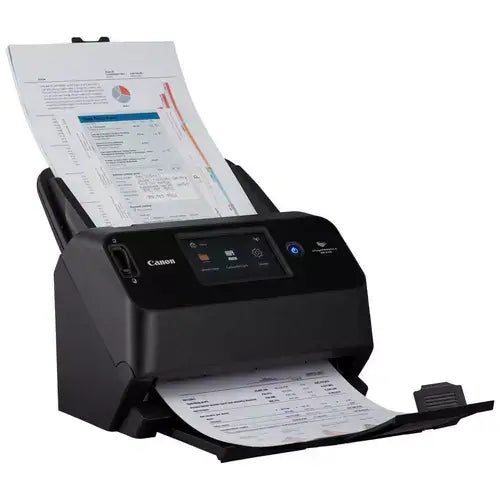
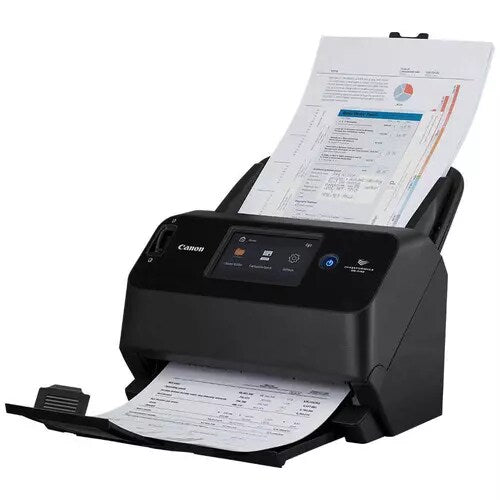
The Canon imageFORMULA DR-S150 is a versatile A4 desktop document scanner designed for busy offices, workgroups and professional environments that need fast scanning with flexible network connectivity. It delivers scanning speeds of up to 45 pages per minute / 90 images per minute in duplex mode and features a generous 60-sheet automatic document feeder for efficient batch scanning.
Unlike a conventional USB-only scanner, the DR-S150 supports USB, wired Ethernet and Wi-Fi connectivity, allowing it to be used by an individual workstation or shared between multiple users across a network. Its built-in processing capability and colour touchscreen also support streamlined scan workflows without requiring users to perform every task from a connected PC.
- ✔ Up to 45 ppm / 90 ipm high-speed duplex scanning
- ✔ 60-sheet automatic document feeder
- ✔ USB, Ethernet and Wi-Fi connectivity
- ✔ 600 × 600 dpi optical scanning resolution
- ✔ Large colour touchscreen for easy operation
- ✔ Supports network and PC-less scanning workflows
- ✔ Scan documents, plastic cards, embossed cards and passports
- ✔ Ideal for offices, workgroups and document-intensive environments
Fast 45PPM Duplex Document Scanning
The Canon imageFORMULA DR-S150 is capable of scanning up to 45 pages per minute, or up to 90 images per minute when scanning both sides of a document in a single pass. This makes it well suited to invoices, forms, contracts, customer records, reports and other high-volume office documents.
Canon's onboard DR Processor handles image processing within the scanner, helping maintain consistent scanning performance without relying entirely on the processing power of the connected computer.
USB, Ethernet and Wi-Fi Connectivity
One of the key advantages of the DR-S150 is its flexible connectivity. It can be connected directly to a computer via USB or shared across an office network using either wired Ethernet or Wi-Fi.
This makes the DR-S150 particularly useful for small and medium businesses, departments and shared workgroups where multiple users need access to the same scanner.
PC-Less and Network Scanning Workflows
The DR-S150 supports more than traditional scan-to-PC operation. Using Canon's CaptureOnTouch Job Tool and network functionality, scan jobs can be configured for streamlined operation directly from the scanner control panel.
Documents can be incorporated into network-based workflows including shared folders and supported cloud-enabled destinations, helping organisations digitise paper records without requiring a dedicated scanning workstation for every user.
60-Sheet Automatic Document Feeder
The integrated 60-sheet ADF allows users to load multi-page document batches and scan them automatically. Canon's document feeding and separation system is designed to handle mixed office documents reliably, reducing the need for constant manual intervention.
Advanced Document Handling
The DR-S150 can scan more than standard office paper. Supported document types include:
- Standard A4 office documents
- Thin paper documents
- Business cards
- Plastic ID cards
- Embossed plastic cards
- Passports up to approximately 4 mm thick when used with the appropriate carrier sheet
This flexibility makes the scanner suitable for industries such as accounting, legal services, healthcare, finance, insurance, government administration and customer service environments.
Automatic Image Processing
The DR-S150 includes a range of image-processing functions designed to reduce manual editing after scanning. Depending on the selected scan workflow and software settings, functions include:
- Automatic colour detection
- Blank-page removal
- Automatic deskew
- Image rotation
- Text enhancement
- Automatic page-size detection
- OCR for searchable document creation
CaptureOnTouch Software
Canon's CaptureOnTouch software provides an easy way to create and save common scanning jobs. Users can configure shortcuts for tasks such as scanning documents to searchable PDF, saving files to designated folders and integrating scanned documents into supported cloud-based workflows.
The DR-S150 also supports Canon's CaptureOnTouch Job Tool, enabling predefined network scan jobs to be selected directly from the scanner.
Key Features
- Scanner Type: Desktop sheetfed document scanner
- Maximum Document Size: A4 / Letter
- Scanning Speed: Up to 45 ppm
- Duplex Speed: Up to 90 ipm
- Duplex Scanning: Yes, single-pass
- ADF Capacity: 60 sheets
- Optical Resolution: Up to 600 × 600 dpi
- Colour Mode: 24-bit colour
- Greyscale: 8-bit / 256 levels
- Connectivity: USB, Ethernet and Wi-Fi
- Control Panel: Colour touchscreen
- OCR Support: Yes
Product Specifications
| Brand | Canon |
| Series | imageFORMULA |
| Model | DR-S150 |
| Scanner Type | A4 Sheetfed Document Scanner |
| Scanning Side | Simplex / Duplex |
| Scanning Speed | Up to 45 ppm / 90 ipm |
| Optical Resolution | Up to 600 × 600 dpi |
| Colour Depth | 24-bit colour |
| ADF Capacity | 60 sheets |
| Connectivity | USB, Ethernet, Wi-Fi |
| Supported Media | Plain paper, business cards, plastic cards, embossed cards and passports via carrier sheet |
| Software | Canon CaptureOnTouch / CaptureOnTouch Job Tool |
| Driver Support | TWAIN; Windows support also includes ISIS / WIA |
Ideal For
- Small and medium businesses
- Shared office workgroups
- Accounting and bookkeeping offices
- Legal and professional services
- Medical and healthcare administration
- Financial services and insurance
- Government and records-management environments
- Businesses digitising large volumes of paper records
Why Choose the Canon DR-S150?
The DR-S150 sits above a basic desktop USB scanner by combining fast 45 ppm duplex scanning with network sharing, Wi-Fi and standalone-style workflow capabilities. It is particularly attractive to offices that want one scanner to serve several users rather than dedicating a separate USB scanner to each workstation.
Its combination of a 60-sheet feeder, flexible media handling, network connectivity and Canon CaptureOnTouch workflow tools makes it a strong choice for businesses moving from manual paper handling toward centralised document capture.
Scanner Maintenance
Like other high-volume sheetfed scanners, feed rollers are wear components and may eventually require replacement after extended use. Replacement roller kits are available separately for compatible Canon imageFORMULA models.
What's Included?
- Canon imageFORMULA DR-S150 Document Scanner
- Power supply and power cable
- Setup and documentation materials
Package contents may vary according to Canon Australia distribution packaging. Please refer to the supplied product documentation for the exact box contents.
Frequently Asked Questions (FAQ)
How fast is the Canon DR-S150?
The Canon imageFORMULA DR-S150 scans at up to 45 pages per minute in simplex mode and up to 90 images per minute when scanning both sides of documents.
Does the Canon DR-S150 scan both sides automatically?
Yes. It supports automatic single-pass duplex scanning, allowing both sides of a document to be captured during one feed through the scanner.
Does the DR-S150 have Wi-Fi?
Yes. The DR-S150 supports Wi-Fi as well as wired Ethernet and USB connectivity.
Can multiple computers share the DR-S150?
Yes. Its wired and wireless network connectivity makes the DR-S150 suitable for shared workgroup environments where multiple users need access to the scanner.
Can the DR-S150 scan without a dedicated PC?
The DR-S150 supports predefined network scan workflows using Canon's CaptureOnTouch Job Tool, allowing selected jobs to be initiated from the scanner control panel without requiring the user to manually operate scanning software for every job.
What is the ADF capacity?
The DR-S150 features a 60-sheet automatic document feeder.
Can it scan plastic cards?
Yes. It supports plastic ID cards and embossed cards within Canon's specified media limits.
Can the DR-S150 scan passports?
Yes. Canon specifies support for passports up to approximately 4 mm thick when scanned using the appropriate carrier sheet.
Does the Canon DR-S150 support OCR?
Yes. Canon's scanning software supports OCR workflows that can convert scanned documents into searchable document files.
Last Updated: 8 September 2026

Estimate shipping