




Description

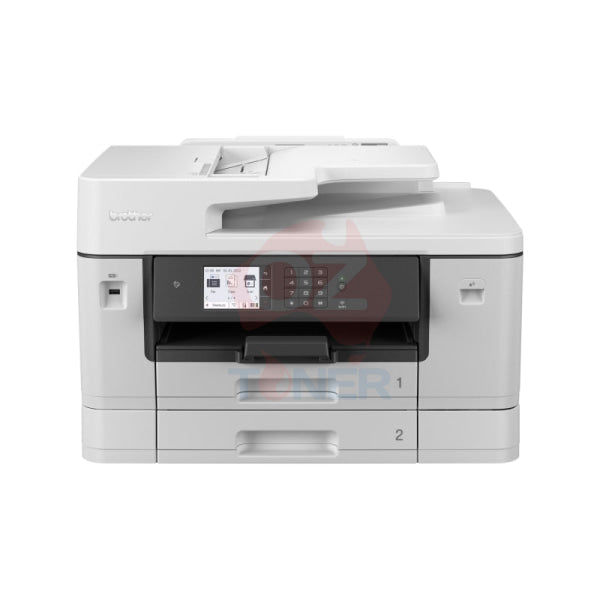
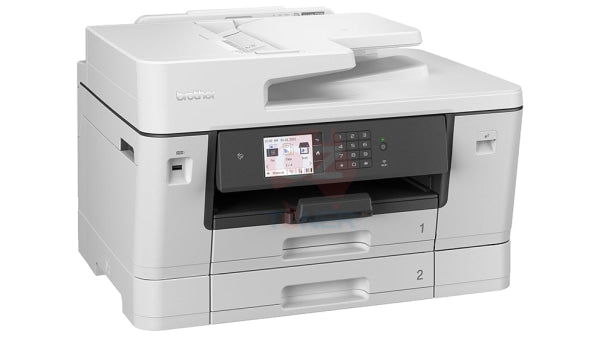
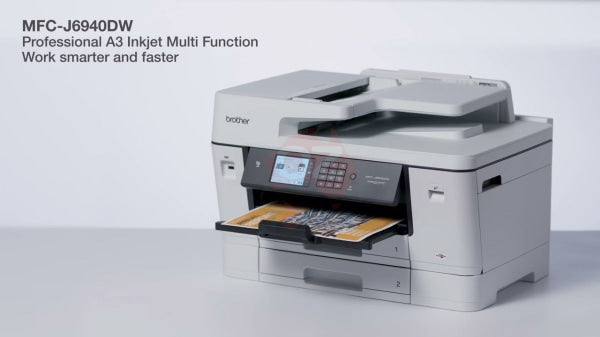
The Brother MFC-J6940DW A3 Colour Inkjet Multi-Function Printer is a powerful business-class All-in-One designed for offices that need genuine A3 printing, scanning, copying and faxing without moving to a large laser multifunction device. With fast print speeds of up to 28 ipm in both mono and colour, automatic duplex printing, single-pass 2-sided A3 scanning, dual 250-sheet paper trays and comprehensive wired and wireless connectivity, it is built for productive small and medium business environments.
A major advantage of the MFC-J6940DW is its versatile A3 paper handling. It provides 2 × 250-sheet lower trays, plus a 100-sheet multi-purpose tray, giving a total input capacity of up to 600 sheets. Its 50-sheet Automatic Document Feeder supports A3 documents and automatic two-sided scanning, making it particularly useful for contracts, plans, spreadsheets, reports and other multi-page business documents.
- ✔ Print / Scan / Copy / Fax up to A3
- ✔ Fast Print Speed – Up to 28 ipm Mono & Colour
- ✔ Automatic 2-Sided (Duplex) A3 Printing
- ✔ Single-Pass 2-Sided A3 Scanning
- ✔ 50-Sheet Duplex Automatic Document Feeder
- ✔ Dual 250-Sheet Lower Paper Trays
- ✔ 100-Sheet Multi-Purpose Tray
- ✔ Up to 600-Sheet Total Paper Input
- ✔ 8.8cm / 3.5" Colour Touchscreen
- ✔ Wi-Fi + Wi-Fi Direct + Ethernet + USB + NFC
- ✔ Uses Brother LC432 & LC432XL Ink Cartridges
- ✔ High Yield LC432XL – Up to 3,000 Black / 1,500 Colour Pages
True A3 Business Multi-Function Capability
The MFC-J6940DW is much more than an A4 office printer that happens to print occasional A3 pages. It is designed as a genuine A3 business multifunction device with support for A3 printing, scanning, copying and faxing.
This makes it particularly useful for businesses working with large spreadsheets, construction or property documents, diagrams, schedules, posters, presentations, marketing materials and other documents that benefit from the larger A3 format.
Single-Pass A3 Duplex Scanning
One of the standout features of the MFC-J6940DW is its single-pass automatic two-sided scanning. The 50-sheet duplex Automatic Document Feeder can scan both sides of a document automatically, reducing the time required to digitise double-sided paperwork.
The ADF supports documents up to A3 size, making this particularly valuable for offices processing contracts, forms, invoices and other large-format multi-page documents.
Dual 250-Sheet Paper Trays + 100-Sheet Multi-Purpose Tray
The MFC-J6940DW provides excellent paper-handling flexibility with:
- ✔ Tray 1 – Up to 250 sheets
- ✔ Tray 2 – Up to 250 sheets
- ✔ Multi-Purpose Tray – Up to 100 sheets
- ✔ Total Maximum Input – Up to 600 sheets
The dual trays allow businesses to keep different paper sizes or media loaded simultaneously. For example, one tray can be configured for everyday A4 documents while the second tray is used for A3 paper.
Fast 28 ipm Mono & Colour Printing
Brother's MaxiDrive print technology enables the MFC-J6940DW to achieve print speeds of up to 28 images per minute in both black and colour. First Page Out Time is approximately 4.6 seconds for mono and 4.4 seconds for colour.
This combination of fast output and A3 capability makes the MFC-J6940DW particularly suitable for busy workgroups that need both everyday A4 printing and larger-format business documents.
Key Features
- ✔ A3 Colour Inkjet Multi-Function Printer
- ✔ Print / Scan / Copy / Fax
- ✔ Up to 28 ipm Black
- ✔ Up to 28 ipm Colour
- ✔ Up to 1200 × 4800 dpi Print Resolution
- ✔ Automatic Duplex Printing
- ✔ Single-Pass Automatic Duplex Scanning
- ✔ 50-Sheet ADF
- ✔ Dual 250-Sheet Paper Trays
- ✔ 100-Sheet Multi-Purpose Tray
- ✔ Up to 600 Sheets Total Input
- ✔ 8.8cm / 3.5" Colour Touchscreen
- ✔ Dual-Band Wireless Networking
- ✔ Gigabit/Wired Ethernet Network Connectivity
- ✔ Wi-Fi Direct
- ✔ USB Connectivity
- ✔ NFC Support
- ✔ Mobile Printing Support
- ✔ Brother Mobile Connect Compatible
- ✔ Cloud Print & Scan Features
A3 Automatic Duplex Printing
The Brother MFC-J6940DW supports automatic two-sided printing on a range of paper sizes including A3 and A4. This allows businesses to create professional double-sided reports, presentations and documents while reducing paper consumption.
Flexible Wired & Wireless Connectivity
The MFC-J6940DW provides a broad range of connectivity options for individual users and shared office environments:
- ✔ Dual-Band 2.4GHz / 5GHz Wi-Fi
- ✔ Wired Ethernet Network
- ✔ Wi-Fi Direct
- ✔ Hi-Speed USB 2.0
- ✔ NFC
- ✔ Brother Mobile Connect
Users can print and scan from compatible computers, smartphones and tablets, while network connectivity allows the printer to be shared across a workgroup.
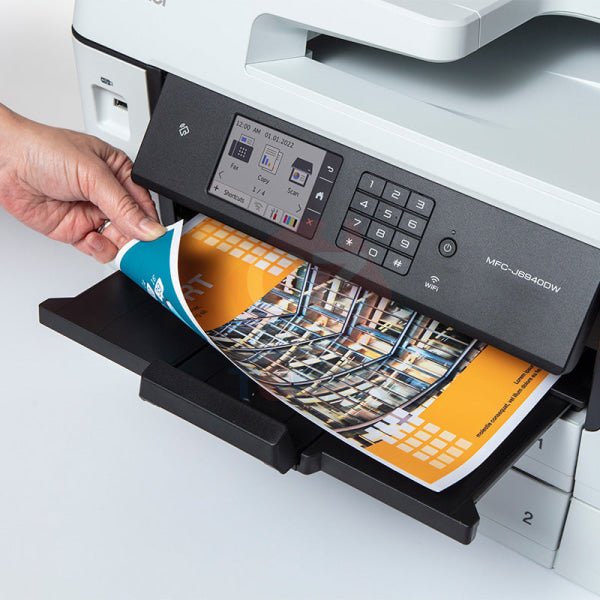
8.8cm Colour Touchscreen
The integrated 8.8cm (3.5-inch) colour touchscreen provides easy access to print, scan, copy, fax and network functions. Frequently used workflows can also be configured as shortcuts for quicker operation.
Brother LC432 Ink Cartridge System
The Brother MFC-J6940DW uses the LC432 ink cartridge family with individually replaceable Black, Cyan, Magenta and Yellow cartridges.
| Cartridge | Colour | Approx. Yield |
| LC432BK | Black | 550 Pages |
| LC432C | Cyan | 550 Pages |
| LC432M | Magenta | 550 Pages |
| LC432Y | Yellow | 550 Pages |
| LC432XLBK | Black High Yield | 3,000 Pages |
| LC432XLC | Cyan High Yield | 1,500 Pages |
| LC432XLM | Magenta High Yield | 1,500 Pages |
| LC432XLY | Yellow High Yield | 1,500 Pages |
The high-yield LC432XL cartridges are particularly useful for business customers with regular print volumes, providing up to approximately 3,000 black pages and 1,500 pages per colour cartridge.
Product Specifications
| Brand | Brother |
| Model | MFC-J6940DW |
| Printer Type | A3 Colour Inkjet Multi-Function Printer |
| Functions | Print / Scan / Copy / Fax |
| Maximum Paper Size | A3 / Ledger |
| Print Speed | Up to 28 ipm Mono / 28 ipm Colour |
| Print Resolution | Up to 1200 × 4800 dpi |
| Automatic Duplex Printing | Yes – Up to A3 |
| Automatic Duplex Scanning | Yes – Single Pass, Up to A3 |
| ADF Capacity | Up to 50 Sheets |
| Paper Tray 1 | 250 Sheets |
| Paper Tray 2 | 250 Sheets |
| Multi-Purpose Tray | Up to 100 Sheets |
| Maximum Paper Input | Up to 600 Sheets |
| Display | 8.8cm / 3.5" Colour Touchscreen |
| Connectivity | USB / Ethernet / Wi-Fi / Wi-Fi Direct / NFC |
| Mobile Printing | Brother Mobile Connect |
| Memory | 256MB |
| Ink Series | Brother LC432 / LC432XL |
| Dimensions (W × D × H) | Approx. 576 × 477 × 375 mm |
| Weight | Approx. 23.4 kg |
| Recommended Monthly Print Volume | 250 – 2,500 Pages |
| Warranty | 1 Year Return to Base Warranty |
Ideal For
- ✔ Small & Medium Businesses
- ✔ Home Offices Requiring A3
- ✔ Accounting & Administration
- ✔ Real Estate & Property Offices
- ✔ Construction & Trade Businesses
- ✔ Schools & Education
- ✔ Marketing & Creative Teams
- ✔ Businesses Scanning Double-Sided A3 Documents
- ✔ Offices Requiring Separate A4 & A3 Paper Trays
Why Choose the Brother MFC-J6940DW?
The MFC-J6940DW is a particularly strong choice when a business needs more than occasional A3 printing. Its combination of A3 print, scan, copy and fax capability, single-pass duplex scanning, automatic duplex printing and dual 250-sheet trays makes it a highly versatile business workstation.
Compared with simpler A3 inkjet printers, the second paper tray and duplex A3 ADF can significantly improve workflow efficiency, especially in offices that regularly switch between A4 and A3 documents.
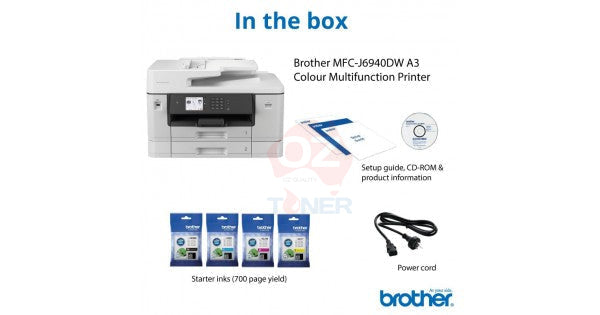
What's Included?
- ✔ 1 × Brother MFC-J6940DW A3 Colour Inkjet Multi-Function Printer
- ✔ Brother Starter Ink Cartridges – Black, Cyan, Magenta & Yellow
- ✔ Power Cord
- ✔ Setup Documentation
Brother specifies the included ink cartridges at approximately 550 pages each for Black, Cyan, Magenta and Yellow. Contents may be subject to manufacturer packaging changes.
Frequently Asked Questions (FAQ)
Can the Brother MFC-J6940DW print A3?
Yes. The MFC-J6940DW is a genuine A3 business multifunction printer capable of printing documents up to A3 / Ledger size.
Can it scan A3 documents?
Yes. The MFC-J6940DW supports scanning up to A3 through its Automatic Document Feeder.
Does it support automatic duplex scanning?
Yes. One of the key advantages of the MFC-J6940DW is its single-pass automatic 2-sided scanning, allowing both sides of a document to be captured without manually turning the pages over.
Can it duplex scan A3 documents?
Yes. The 50-sheet Automatic Document Feeder supports automatic two-sided scanning of documents up to A3 size.
Does the MFC-J6940DW have two paper trays?
Yes. It has two 250-sheet lower paper trays, providing 500 sheets of standard tray capacity, plus a 100-sheet multi-purpose tray for a maximum input capacity of up to 600 sheets.
Can I keep A4 in one tray and A3 in the other?
Yes. This is one of the major advantages of the dual-tray configuration. Different supported paper sizes can be loaded into the two trays to reduce the need for frequent paper changes.
Does it automatically print on both sides?
Yes. The MFC-J6940DW supports automatic duplex printing, including supported A3 paper sizes.
What ink cartridges does the MFC-J6940DW use?
It uses Brother LC432 standard-yield and LC432XL high-yield Black, Cyan, Magenta and Yellow ink cartridges.
What is the yield of the LC432XL cartridges?
The LC432XLBK High Yield Black cartridge provides approximately 3,000 pages, while LC432XL Cyan, Magenta and Yellow cartridges each provide approximately 1,500 pages.
Does it have Wi-Fi and Ethernet?
Yes. The MFC-J6940DW supports wireless networking, Wi-Fi Direct, wired Ethernet, USB and NFC connectivity.
Is this printer suitable for a business office?
Yes. Brother positions the MFC-J6940DW as an A3 business inkjet multifunction printer. Its fast printing, large paper capacity, dual trays, A3 functionality and duplex document handling make it particularly suitable for small and medium business environments.
What is the recommended monthly print volume?
Brother specifies a recommended monthly print volume of approximately 250 to 2,500 pages.
General
-
- Barcode
- 4977766818018
-
- Borderless Photo Printing
- Yes
-
- Brand
- Brother
-
- Descriptive Colour
- White
-
- Functions
- Copier, Fax, Printer, Scanner
-
- Manufacturer's Warranty
- 12 month
-
- Material
- Plastic
-
- Microsoft Certification
- Yes
-
- Model Number
- MFC-J6940DW
-
- Paper Size
- A3, A4, A5
-
- Photo Ink Colour Qty
- 4
-
- Print Direct from USB
- Yes
-
- Printer Type
- Colour Inkjet
-
- Printhead Type
- Maxidrive
-
- Printing Output Type
- Colour
-
- Printing Technology
- Ink-jet
-
- Product Dimensions (mm)
- 576W x 477D x 375H mm
-
- Product Weight (kg)
- 23.5 kg
-
- USB Cable Included
- No
Compatibility
-
- ePrint Application Supported
- Brother Mobile Connect
-
- OS Required
- WIN: 7/8.1/10/Server 2008/2008 R2/2012/2012 R2/2016/2019 macOS: 10.14.6/10.15.x/11
-
- PostScript Support
- No
Connectivity
-
- AirPrint Compatible
- Yes
-
- Mobile App Compatible
- Brother Mobile Connect
-
- PC Connection
- USB 2.0, LAN, USB Host, WiFi, Wireless LAN 2.4Ghz/5Ghz
-
- Printer Connectivity Technology
- AirPrint, Mobile print, Wired, Wireless
-
- Wi-Fi Direct Compatible
- Yes
-
- Wireless Protocols
- Infrastructure Mode:IEEE 802.11 b/g/n Wi-Fi Direct: IEEE 802.11 g/n, (2.4Ghz) Infrastructure Mode:IEEE 802.11a/n Wi-Fi Direct: IEEE 802.11 a/n (5Ghz)
Copier Features
-
- 2-sided copying
- Yes
-
- Copy Resizing
- 25-400%
-
- First Copy Out Time B/W (sec)
- 5 sec
-
- First Copy Out Time Colour (sec)
- 5 sec
-
- Max Resolution B/W
- 1200x4800 dpi
-
- Max Resolution Colour
- 1200x4800 dpi
-
- Max Speed B/W
- 25ipm
-
- Max Speed Colour
- 24ipm
Display
-
- Display Size (Diagonal)
- 3.5 in
-
- Display Type
- TFT LCD
Document and Media Handling
-
- Automatic Document Feeder Capacity
- 50 sheets
-
- Largest Print Size
- A3
-
- Max Media Capacity
- 650
-
- Media Handling
- 2x250 sheet tray, 1x 100 sheet rear feeder, 50 sheets ADF
-
- Media Size Class
- A3/A4
-
- Media Thickness
- 64-220g/m2
-
- Media Type
- Palin Paper, glossy paper, Envelopes, Labels
-
- Print on CD/DVD
- N/A
-
- Standard Tray Capacity
- 2x250 sheets; 1x100 sheets
-
- Total Media Capacity
- 600 sheets
Faxing Features
-
- Fax Transmission Speed (kbps)
- 33.6
-
- Fax Type
- Plain Paper
-
- Faxing Functionality
- Yes
-
- Max Transmission Speed
- 33.6kbps
-
- PC Faxing
- Yes
Manufacturer
-
- Country of Manufacture
- Philippines
-
- Part Number
- MFC-J6940DW
Packaging and Assembly
-
- Two Person Delivery Required
- Yes
Performance
-
- Software Bundle Provided
- WIN / Mac Drivers for Print / Scan
Printer Performance
-
- 2-sided printing
- Yes
-
- Max Black and White Printing Speed
- 28 ipm
-
- Max Colour Printing Speed
- 28 ipm
-
- Max Printing Speed Colour (ppm)
- 32
-
- Max Resolution B/W
- Up to 1200 x 4800 dpi
-
- Max Resolution Colour
- Up to 1200 x 4800 dpi
-
- Print Resolution (DPI x DPI)
- Up to 1200 x 4800 dpi
Quantity
-
- Pack/Carton Quantity
- 1
-
- Total Individual Units
- 1
-
- Units Per Pack/Carton
- 1
Refilling
-
- Compatible Consumables/Refills
- LC432 & LC432XL
Scanner Features
-
- 2-sided scanning
- Yes
