
![Brother Inkvestment MFC-J6955DW A3 Colour Inkjet MFC Printer /w LC436 Ink Set [MFCJ6955DW]](http://oztoner.au/cdn/shop/files/RFB_MFC-J6955DW_Front.webp?v=1758422138&width=1280)
![Brother Inkvestment Mfc-J6955Dw A3 Colour Inkjet Mfc Printer /W Lc436 Ink Set [Mfcj6955Dw]](http://oztoner.au/cdn/shop/files/brother-inkvestment-mfc-j6955dw-a3-colour-inkjet-printer-w-lc436-ink-set-mfcj6955dw-748.jpg?v=1771114727&width=600)
![Brother Inkvestment Mfc-J6955Dw A3 Colour Inkjet Mfc Printer /W Lc436 Ink Set [Mfcj6955Dw]](http://oztoner.au/cdn/shop/files/brother-inkvestment-mfc-j6955dw-a3-colour-inkjet-printer-w-lc436-ink-set-mfcj6955dw-205.jpg?v=1771114727&width=600)
![Brother Inkvestment Mfc-J6955Dw A3 Colour Inkjet Mfc Printer /W Lc436 Ink Set [Mfcj6955Dw]](http://oztoner.au/cdn/shop/files/brother-inkvestment-mfc-j6955dw-a3-colour-inkjet-printer-w-lc436-ink-set-mfcj6955dw-993.jpg?v=1771114727&width=600)
![Brother Inkvestment Mfc-J6955Dw A3 Colour Inkjet Mfc Printer /W Lc436 Ink Set [Mfcj6955Dw]](http://oztoner.au/cdn/shop/files/brother-inkvestment-mfc-j6955dw-a3-colour-inkjet-printer-w-lc436-ink-set-mfcj6955dw-179.jpg?v=1771114727&width=600)
![Brother Inkvestment MFC-J6955DW A3 Colour Inkjet MFC Printer /w LC436 Ink Set [MFCJ6955DW]](http://oztoner.au/cdn/shop/files/RFB_MFC-J6955DW_Front_1024x.webp?v=1758422138)
![Brother Inkvestment Mfc-J6955Dw A3 Colour Inkjet Mfc Printer /W Lc436 Ink Set [Mfcj6955Dw]](http://oztoner.au/cdn/shop/files/brother-inkvestment-mfc-j6955dw-a3-colour-inkjet-printer-w-lc436-ink-set-mfcj6955dw-748_1024x.jpg?v=1771114727)
![Brother Inkvestment Mfc-J6955Dw A3 Colour Inkjet Mfc Printer /W Lc436 Ink Set [Mfcj6955Dw]](http://oztoner.au/cdn/shop/files/brother-inkvestment-mfc-j6955dw-a3-colour-inkjet-printer-w-lc436-ink-set-mfcj6955dw-205_1024x.jpg?v=1771114727)
![Brother Inkvestment Mfc-J6955Dw A3 Colour Inkjet Mfc Printer /W Lc436 Ink Set [Mfcj6955Dw]](http://oztoner.au/cdn/shop/files/brother-inkvestment-mfc-j6955dw-a3-colour-inkjet-printer-w-lc436-ink-set-mfcj6955dw-993_1024x.jpg?v=1771114727)
![Brother Inkvestment Mfc-J6955Dw A3 Colour Inkjet Mfc Printer /W Lc436 Ink Set [Mfcj6955Dw]](http://oztoner.au/cdn/shop/files/brother-inkvestment-mfc-j6955dw-a3-colour-inkjet-printer-w-lc436-ink-set-mfcj6955dw-179_1024x.jpg?v=1771114727)

Description

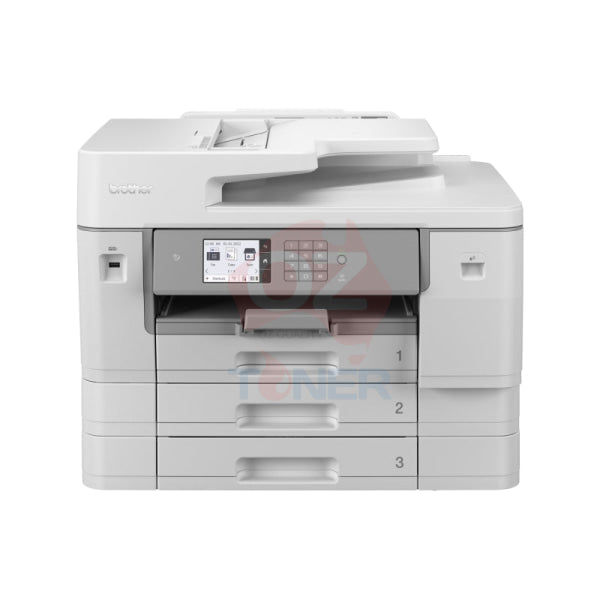
The Brother MFC-J6955DW INKvestment Tank A3 Colour Inkjet Multifunction Printer is a powerful 4-in-1 business printer designed for offices and workgroups that need fast, flexible A3 colour printing without the running costs traditionally associated with cartridge-based inkjet printers. Combining Print, Copy, Scan and Fax functions with automatic A3 duplex printing and scanning, dual paper trays and Brother's high-capacity INKvestment Tank system, it is built for serious everyday business use.
With print speeds of up to 30ipm in both black and colour, a fast first page out time from approximately 4.4 seconds, a 50-sheet duplex ADF and up to 600 sheets of total paper input, the MFC-J6955DW is particularly well suited to businesses that regularly work with both A4 and A3 documents. This OzToner bundle also includes an additional Genuine Brother LC436 Black, Cyan, Magenta and Yellow ink cartridge set for added value and additional printing capacity.
- ✔ Print + Copy + Scan + Fax
- ✔ Full A3 Printing, Scanning, Copying & Faxing
- ✔ Up to 30ipm Black & 30ipm Colour
- ✔ Automatic A3 2-Sided Duplex Printing
- ✔ Single-Pass Automatic Duplex A3 Scanning
- ✔ 50-Sheet Automatic Document Feeder
- ✔ 2 × 250-Sheet A3 Paper Trays
- ✔ 100-Sheet Multi-Purpose Tray
- ✔ Up to 600-Sheet Total Paper Capacity
- ✔ Dual-Band Wi-Fi + Ethernet + Wi-Fi Direct + NFC + USB
- ✔ 8.8cm / 3.5" Colour Touchscreen
- ✔ Brother Mobile Connect
- ✔ Genuine LC436 Ink Supplied In-Box
- ✔ Additional Genuine LC436 BK/C/M/Y Ink Set Included in This Bundle
- ✔ 2-Year Return-to-Base Warranty
Professional A3 Printing for Business
The MFC-J6955DW is designed for businesses that need more than basic A4 printing. It supports media sizes up to A3 / Ledger and can automatically print double-sided documents up to A3, making it suitable for reports, spreadsheets, plans, presentations, brochures, schedules and other larger-format business documents.
Brother's MaxiDrive print technology delivers print speeds of up to 30.0ipm in both mono and colour, with a first page out time as fast as approximately 4.4 seconds for colour.
Key Features
- ✔ A3 Colour Inkjet Multifunction Printer
- ✔ Print, Copy, Scan & Fax
- ✔ Brother INKvestment Tank Technology
- ✔ Brother MaxiDrive Print Technology
- ✔ Up to 30.0ipm Black Print Speed
- ✔ Up to 30.0ipm Colour Print Speed
- ✔ First Page Out from Approx. 4.4 Seconds
- ✔ Up to 1,200 × 4,800 dpi Print Resolution
- ✔ Automatic A3 Duplex Printing
- ✔ Automatic A3 Duplex Scanning
- ✔ Single-Pass 2-Sided Scanning
- ✔ 50-Sheet Automatic Document Feeder
- ✔ 2 × 250-Sheet Main Paper Trays
- ✔ 100-Sheet Multi-Purpose Tray
- ✔ Up to 600-Sheet Total Paper Capacity
- ✔ Dual-Band Wireless Networking
- ✔ Wired Ethernet LAN
- ✔ Wi-Fi Direct
- ✔ NFC
- ✔ Hi-Speed USB 2.0
- ✔ Brother Mobile Connect Support
- ✔ 8.8cm / 3.5" Colour Touchscreen
- ✔ 512MB Memory
Full A3 Print, Scan, Copy & Fax
Unlike many printers described as A3-capable that only provide A3 printing, the MFC-J6955DW provides comprehensive A3 functionality across printing, scanning, copying and faxing.
This makes it particularly useful for businesses handling larger originals such as plans, spreadsheets, diagrams, schedules, forms and marketing materials without needing a separate A3 scanner or copier.
Single-Pass Automatic Duplex A3 Scanning
The built-in 50-sheet Automatic Document Feeder (ADF) supports automatic two-sided scanning up to A3. Its single-pass duplex scanning system captures both sides of a document efficiently, helping speed up the digitisation of multi-page double-sided documents.
This is a major productivity advantage for offices regularly scanning contracts, invoices, forms, reports and archived paperwork.
Automatic A3 Duplex Printing
The MFC-J6955DW can automatically print on both sides of supported media up to A3 / Ledger size. This helps reduce paper consumption while making it easy to produce professional double-sided reports, booklets and business documents.
Flexible 600-Sheet Paper Capacity
The MFC-J6955DW offers substantial and flexible paper handling across three paper sources:
| Paper Tray 1 | Up to 250 Sheets – Up to A3 |
| Paper Tray 2 | Up to 250 Sheets – Up to A3 |
| Multi-Purpose Tray | Up to 100 Sheets – Up to A3 |
| Automatic Document Feeder | Up to 50 Sheets |
| Total Printer Input Capacity | Up to 600 Sheets |
| Output Capacity | Up to 100 Sheets A4 / Letter; 50 Sheets Above A4 |
The dual 250-sheet trays are especially useful for businesses that regularly switch between A4 and A3 paper, allowing different sizes or media to remain loaded and ready for use.
INKvestment Tank – High-Capacity Ink Without Manual Refilling
Brother's INKvestment Tank system combines high-capacity cartridges with an internal ink storage system. Unlike traditional refillable bottle-based tank printers, users simply replace the appropriate Brother LC436 cartridge when required rather than manually pouring ink into external tanks.
Brother supplies the MFC-J6955DW with inbox ink rated at up to 3,000 pages black and 3,000 pages colour. Some of this ink is used during initial printer setup to fill the internal ink delivery system.
Additional Genuine Brother LC436 Ink Set Included
In addition to the ink supplied with the printer, this OzToner bundle includes an additional Genuine Brother LC436 Black, Cyan, Magenta and Yellow ink cartridge set, providing additional replacement ink ready for future use.
| Additional Cartridge | Colour | Approx. Rated Yield |
| LC436BK | Black | Up to 3,000 Pages |
| LC436C | Cyan | Up to 1,500 Pages |
| LC436M | Magenta | Up to 1,500 Pages |
| LC436Y | Yellow | Up to 1,500 Pages |
Approximate declared yields are measured in accordance with ISO/IEC 24711. Actual yield varies according to printed content, settings, print frequency and operating conditions.
Super High Yield LC436XL Ink Available
For businesses with higher ongoing print volumes, the MFC-J6955DW also supports Brother's super high-yield LC436XL replacement cartridges.
| Cartridge | Colour | Approx. Yield |
| LC436XLBK | Black | Up to 6,000 Pages |
| LC436XLC | Cyan | Up to 5,000 Pages |
| LC436XLM | Magenta | Up to 5,000 Pages |
| LC436XLY | Yellow | Up to 5,000 Pages |
Flexible Wired & Wireless Connectivity
The MFC-J6955DW provides extensive connectivity options for individual users and shared business environments:
- Dual-Band Wi-Fi
- Wired Ethernet LAN
- Wi-Fi Direct
- NFC
- Hi-Speed USB 2.0
- Brother Mobile Connect
Users can print and scan from compatible computers, smartphones and tablets, while wired Ethernet makes the printer easy to integrate into an office network.
Mobile & Cloud Productivity
Brother Mobile Connect allows compatible smartphones and tablets to print, scan and manage documents directly from a mobile device.
The printer also supports convenient cloud workflows, allowing users to print from and scan to supported online services such as Google Drive, Dropbox and OneDrive when connected to the internet.

Product Specifications
| Brand | Brother |
| Model | MFC-J6955DW |
| Manufacturer Part Number | MFCJ6955DW |
| Printer Type | A3 Colour INKvestment Tank Inkjet Multifunction Printer |
| Functions | Print / Copy / Scan / Fax |
| Maximum Paper Size | A3 / Ledger |
| Print Speed | Up to 30.0ipm Black / 30.0ipm Colour |
| First Page Out | Approx. 4.6 sec Black / 4.4 sec Colour |
| Print Resolution | Up to 1,200 × 4,800 dpi |
| Automatic Duplex Printing | Yes – Up to A3 / Ledger |
| Duplex Scanning | Yes – Single-Pass, Up to A3 |
| ADF | 50 Sheets |
| Paper Tray 1 | 250 Sheets |
| Paper Tray 2 | 250 Sheets |
| Multi-Purpose Tray | 100 Sheets |
| Maximum Paper Input | 600 Sheets |
| Scanner Glass Resolution | Up to 1,200 × 1,200 dpi Colour / 1,200 × 2,400 dpi Mono |
| Connectivity | USB 2.0 / Ethernet / Dual-Band Wi-Fi / Wi-Fi Direct / NFC |
| Mobile Printing | Brother Mobile Connect |
| Display | 8.8cm / 3.5" Colour TFT Touchscreen |
| Memory | 512MB |
| Recommended Monthly Print Volume | 250–3,500 Pages |
| Dimensions (W × D × H) | Approx. 575 × 477 × 379mm |
| Weight | Approx. 24.2kg |
| Power Supply | AC 220–240V, 50/60Hz |
| Warranty | 2 Years Return to Base |
Ideal For
- ✔ Small & Medium Businesses
- ✔ Professional Offices
- ✔ Accounting & Administration Teams
- ✔ Construction, Property & Trade Businesses
- ✔ Schools & Educational Organisations
- ✔ Medical & Professional Practices
- ✔ Businesses Requiring Regular A3 Printing
- ✔ Offices Requiring A3 Scanning & Copying
- ✔ Workgroups Requiring Duplex Multi-Page Scanning
- ✔ Businesses Looking to Reduce Colour Printing Costs
Why Choose the Brother MFC-J6955DW?
The MFC-J6955DW stands out because it combines true A3 multifunction capability with fast business-class inkjet performance. Its 30ipm print speed, single-pass duplex A3 scanner, 50-sheet ADF, dual 250-sheet trays and 100-sheet multi-purpose tray make it considerably more capable than entry-level A3 inkjet printers.
For businesses that need regular A3 colour output but do not necessarily require a large A3 colour laser multifunction device, the MFC-J6955DW offers an attractive balance of functionality, physical size and ongoing ink costs.
Warranty & Support
The Brother MFC-J6955DW is backed by a 2-Year Return-to-Base Warranty in Australia, together with Brother customer support for the life of the product.
What's Included?
- ✔ 1 × Brother MFC-J6955DW A3 Colour Multifunction Printer
- ✔ Genuine Brother Inbox Ink Cartridges
- ✔ 1 × Additional Genuine Brother LC436BK Black Ink Cartridge
- ✔ 1 × Additional Genuine Brother LC436C Cyan Ink Cartridge
- ✔ 1 × Additional Genuine Brother LC436M Magenta Ink Cartridge
- ✔ 1 × Additional Genuine Brother LC436Y Yellow Ink Cartridge
- ✔ Power Cable & Standard Supplied Documentation
Frequently Asked Questions (FAQ)
Can the Brother MFC-J6955DW print A3?
Yes. The MFC-J6955DW supports printing up to A3 / Ledger size and includes two 250-sheet A3-capable paper trays plus a 100-sheet multi-purpose tray.
Can the MFC-J6955DW scan and copy A3 documents?
Yes. Unlike printers that only offer A3 printing, the MFC-J6955DW supports A3 printing, scanning, copying and faxing.
Does the MFC-J6955DW automatically scan both sides?
Yes. It features a 50-sheet single-pass duplex ADF capable of automatically scanning both sides of supported documents up to A3.
Does the MFC-J6955DW automatically print double-sided A3?
Yes. Automatic duplex printing is supported on compatible media sizes up to A3 / Ledger.
How fast does the Brother MFC-J6955DW print?
Brother rates the MFC-J6955DW at up to 30.0ipm for both black and colour, with first page out from approximately 4.4 seconds depending on the print job.
How much paper can the MFC-J6955DW hold?
It provides two 250-sheet main trays plus a 100-sheet multi-purpose tray, giving a maximum printer input capacity of up to 600 sheets.
Does this printer use refillable ink bottles?
No. Brother's INKvestment Tank system uses high-capacity LC436 ink cartridges feeding an internal ink storage system. Users replace cartridges rather than manually pouring bottled ink into tanks.
What ink cartridges does the MFC-J6955DW use?
It uses the Brother LC436 cartridge family. Standard replacement cartridges include LC436BK, LC436C, LC436M and LC436Y. Higher-volume users can choose LC436XL cartridges with yields of up to 6,000 pages Black and 5,000 pages for each colour.
Does the new MFC-J6955DW already include ink?
Yes. Brother supplies ink with the new printer, rated at up to 3,000 pages Black and 3,000 pages Colour before allowance for ink used during initial setup. This particular bundle also includes an additional Genuine Brother LC436 BK/C/M/Y replacement ink set.
Does the MFC-J6955DW support Wi-Fi and Ethernet?
Yes. Connectivity includes dual-band Wi-Fi, wired Ethernet, Wi-Fi Direct, NFC and Hi-Speed USB 2.0.
Is the MFC-J6955DW suitable for a business office?
Yes. Its A3 functionality, 30ipm print speed, 600-sheet paper capacity, 50-sheet duplex ADF, wired and wireless networking and recommended monthly print volume of 250–3,500 pages make it particularly suitable for small and medium business environments.
What warranty does the Brother MFC-J6955DW include?
Brother Australia specifies a 2-Year Return-to-Base Warranty for the MFC-J6955DW.
INKvestment MFC-J6955DW Summary Sheet
The main difference between the Brother Inkvestment MFC-J6955DW and the MFC-J6555DW lies in their paper handling capabilities and some minor feature variations. Here's a breakdown of the key differences:
-
Paper Capacity:
- MFC-J6955DW: This model typically comes with a higher paper capacity, including additional trays or support for handling more sheets.
- MFC-J6555DW: Slightly lower paper capacity compared to the MFC-J6955DW, but still supports large volumes for office use.
-
Functionality:
- Both models offer similar core functionalities like printing, scanning, copying, and faxing, but the MFC-J6955DW might include enhanced features like faster printing speed or better document handling capabilities.
-
Target Use:
- The MFC-J6955DW is designed for more heavy-duty office environments that need higher productivity and efficiency.
- The MFC-J6555DW is ideal for small to medium-sized businesses, offering slightly fewer features but at a lower price point.
-
Price:
- The MFC-J6955DW generally has a higher price tag due to its additional features and capabilities compared to the MFC-J6555DW.
In summary, while both printers are part of the Brother Inkvestment series and share many similarities, the MFC-J6955DW is better suited for larger or more demanding office environments with higher paper handling needs, while the MFC-J6555DW is geared toward medium-sized office setups.

Estimate shipping