
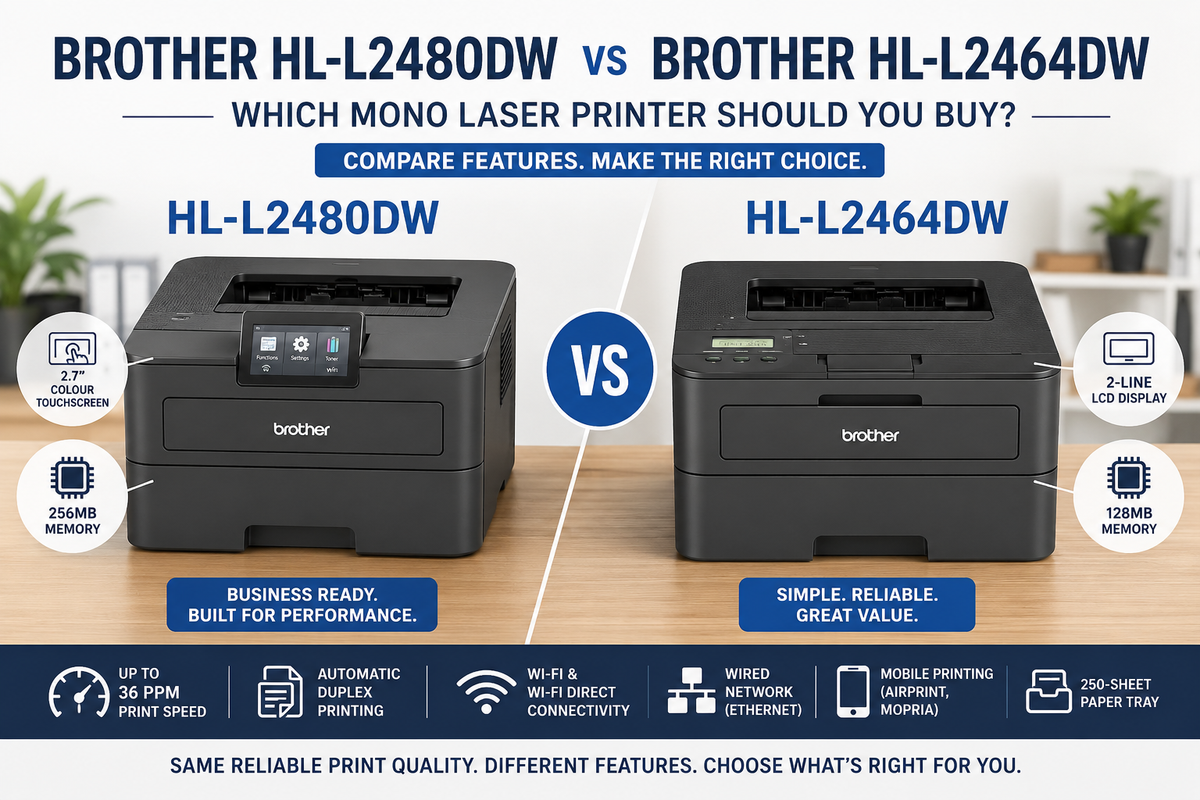
Choosing between the Brother HL-L2480DW and HL-L2464DW? At first glance, these two compact monochrome laser multifunction printers look remarkably similar. Both offer printing, scanning, copying, automatic duplex printing and wireless connectivity.
However, there are four important differences that can significantly affect your everyday printing experience: print speed, Ethernet connectivity, internal memory and control panel design.
The HL-L2464DW is designed for straightforward home and small office printing, while the HL-L2480DW adds faster output, wired networking and a more advanced user interface.
In this comparison, we examine their specifications, running costs and practical differences to help you select the right Brother laser printer for your needs.

QUICK ANSWER: WHAT IS THE MAIN DIFFERENCE?
- HL-L2480DW: 34ppm, Ethernet, 256MB memory and 6.8cm colour touchscreen.
- HL-L2464DW: 28ppm, Wi-Fi/USB, 128MB memory and 2-line LCD.
- Both: Print, scan, copy, automatic duplex and 250-sheet paper capacity.
- Consumables: Both use the same TN-2530 toner family and DR-2530 drum.
The HL-L2480DW offers approximately 21% faster rated printing speed and additional networking flexibility.
Brother HL-L2480DW vs HL-L2464DW: Full Specification Comparison
| Feature | HL-L2464DW | HL-L2480DW |
|---|---|---|
| Functions | Print / Scan / Copy | Print / Scan / Copy |
| Print Speed (A4) | 28ppm | 34ppm |
| Ethernet | No | Yes – 10/100Mbps |
| Wi-Fi | 2.4/5GHz | 2.4/5GHz |
| USB | USB 2.0 | USB 2.0 |
| Memory | 128MB | 256MB |
| Display | 2-Line LCD | 6.8cm Colour Touchscreen |
| Print Resolution | Up to 1200 x 1200dpi | Up to 1200 x 1200dpi |
| Automatic Duplex | Yes | Yes |
| Paper Capacity | 250 Sheets | 250 Sheets |
| Scanner | Colour Flatbed | Colour Flatbed |
| ADF | No | No |
| Standard Toner | TN-2530 | TN-2530 |
| High-Yield Toner | TN-2530XL | TN-2530XL |
1. Print Speed: 34ppm vs 28ppm
One of the most noticeable differences is printing speed.
The Brother HL-L2480DW prints up to 34 A4 pages per minute, compared with 28ppm on the HL-L2464DW.
That represents approximately 21% faster rated printing performance.
For example, a 100-page document would theoretically take:
- HL-L2464DW: Approximately 3 minutes 34 seconds.
- HL-L2480DW: Approximately 2 minutes 56 seconds.
These estimates exclude initial processing, warm-up and other delays, but demonstrate the difference in rated engine speed.
For occasional printing, the difference may be relatively minor. However, when producing longer reports, invoices or business documents throughout the day, faster output becomes more useful.
2. Ethernet Connectivity: An Important Office Upgrade
This is arguably one of the most practical differences between the two models.
The HL-L2464DW provides dual-band wireless connectivity, Wi-Fi Direct and USB, but does not include an Ethernet port.
The HL-L2480DW adds a dedicated 10/100Mbps Ethernet connection, allowing the printer to connect directly to a router or network switch.
Why does Ethernet matter?
- Provides a wired alternative to wireless networking.
- Reduces reliance on Wi-Fi signal strength.
- Suitable for offices with multiple computers sharing a printer.
- Useful in environments where wired networking is preferred.
- Allows the printer to remain connected to the local network through an Ethernet cable.
For a single computer or a small home office with reliable Wi-Fi, the HL-L2464DW may provide everything required.
For a shared office environment, the additional Ethernet port on the HL-L2480DW provides greater connection flexibility.
3. Internal Memory: 256MB vs 128MB
The HL-L2480DW includes 256MB internal memory, double the 128MB available on the HL-L2464DW.
Printer memory is used to process and manage print data before it is transferred to the printing engine.
Additional memory can be useful when handling:
- Large PDF documents.
- Graphics-heavy reports.
- Complex print jobs.
- Multiple queued documents.
However, memory capacity alone does not guarantee that every print job will process twice as quickly. Actual performance also depends on the document, printer driver and network connection.
For everyday text documents, 128MB may be sufficient. The HL-L2480DW provides additional processing headroom for more demanding office use.

4. Control Panel: Colour Touchscreen vs 2-Line LCD
The HL-L2464DW uses a conventional 2-line LCD with physical navigation buttons.
It provides access to essential functions but requires navigating through text-based menus.
The HL-L2480DW upgrades to a 6.8cm (2.7-inch) colour touchscreen.
This makes everyday operation more convenient when:
- Changing printer settings.
- Configuring network connections.
- Accessing scanning and copying functions.
- Checking printer status.
- Navigating maintenance options.
For households or offices where several people use the same machine, the touchscreen offers a more intuitive interface.
Importantly, the colour touchscreen does not mean the HL-L2480DW can print in colour. Both models are monochrome laser printers, although their scanners support colour scanning.
5. What Do Both Printers Have in Common?
Despite their differences, both printers share several useful features:
- 3-in-1 print, scan and copy functionality.
- Monochrome laser printing.
- Print resolution up to 1200 x 1200dpi.
- Automatic A4 double-sided printing.
- 250-sheet paper input tray.
- Single-sheet manual feed slot.
- Dual-band 2.4GHz/5GHz Wi-Fi.
- Wi-Fi Direct and USB connectivity.
- Colour flatbed scanning.
- Compatible Brother TN-2530 toner family.
Neither model includes an automatic document feeder (ADF). If you regularly scan multi-page documents, consider a Brother multifunction printer equipped with an ADF.
6. Toner Compatibility and Running Costs
Another important advantage is that both printers use the same toner and drum family.
| Consumable | Approximate Yield |
|---|---|
| TN-2530 Standard Toner | 1,200 Pages |
| TN-2530XL High-Yield Toner | 3,000 Pages |
| DR-2530 Drum Unit | Separate Replaceable Drum |
Both models support high-yield replacement toner cartridges, making them suitable for regular document printing.
Because they use the same consumables, their toner cost per page is broadly comparable when using equivalent cartridges.
Choosing the HL-L2480DW therefore provides additional hardware features without requiring a different toner family.
7. Which Brother Printer Should You Choose?
Choose the HL-L2464DW if:
- You mainly print everyday home or office documents.
- You want to minimise the initial purchase cost.
- Wireless or USB connectivity is sufficient.
- You do not require a touchscreen.
- Your printing volume is relatively light.
Choose the HL-L2480DW if:
- You regularly print longer documents.
- You need Ethernet networking.
- Multiple users share the printer.
- You prefer a colour touchscreen.
- You want additional internal memory.
- You need faster 34ppm printing.
For customers comparing these models, the key question is whether the faster print engine, Ethernet port and touchscreen justify the difference in purchase price for their particular workflow.
Shop Brother HL-L2480DW and HL-L2464DW at OZ Toner
Explore both models and compare current product information:
Brother HL-L2480DW – 34ppm Multifunction Printer
Fast monochrome printing, Ethernet connectivity, 256MB memory and colour touchscreen.
Brother HL-L2464DW – 28ppm Multifunction Printer
Compact wireless printing, scanning and copying with automatic duplex.
Frequently Asked Questions
Q: Is the Brother HL-L2480DW faster than the HL-L2464DW?
Yes. The HL-L2480DW prints at up to 34ppm, compared with 28ppm on the HL-L2464DW.
Q: Does the Brother HL-L2464DW have an Ethernet port?
No. It supports wireless networking, Wi-Fi Direct and USB. The HL-L2480DW includes an Ethernet port.
Q: Which model has more memory?
The HL-L2480DW has 256MB, compared with 128MB on the HL-L2464DW.
Q: Do both models support scanning and copying?
Yes. Both are 3-in-1 multifunction printers with flatbed scanners.
Q: Can both printers automatically print on both sides?
Yes. Both support automatic A4 duplex printing.
Q: Do both printers use the same toner?
Yes. Both use Brother TN-2530 and TN-2530XL toner cartridges and the DR-2530 drum unit.
Q: Does the HL-L2480DW print in colour?
No. It prints in black and white but supports colour scanning and features a colour touchscreen.
Final Thoughts
The Brother HL-L2464DW and HL-L2480DW share the same essential multifunction capabilities, but the HL-L2480DW offers several meaningful hardware upgrades.
The biggest differences are its faster 34ppm printing speed, dedicated Ethernet port, larger 256MB memory and 6.8cm colour touchscreen.
For basic home printing, the HL-L2464DW provides a practical and economical solution. For users who need faster printing, wired networking and more convenient operation, the HL-L2480DW offers additional functionality.
Both models use the same toner family, so choosing between them is primarily a question of hardware features, workflow requirements and upfront purchase price.
Last Updated Date: 29 September 2026